ChangeSet Approval and Deployment Process
Updated
The ChangeSet Approval and Deployment process helps teams review, approve, and deploy inbound ChangeSets in a controlled and auditable way. It ensures that configuration changes sent from another Sprinklr environment (for example, Sandbox to Production) are reviewed for conflicts and approved by the right stakeholders before deployment.
This article explains the current end‑to‑end flow for reviewing, approving, and deploying inbound ChangeSets.
This article is intended for:
Administrators managing Sandbox and Production deployments
Approvers responsible for reviewing and approving ChangeSets
Platform owners overseeing governance and change control
Benefits
Introduces a structured compliance and sign-off process directly within the platform.
Ensures all approvals are recorded, enhancing traceability and accountability.
Strengthening compliance by documenting the approval process directly within the platform.
Permissions
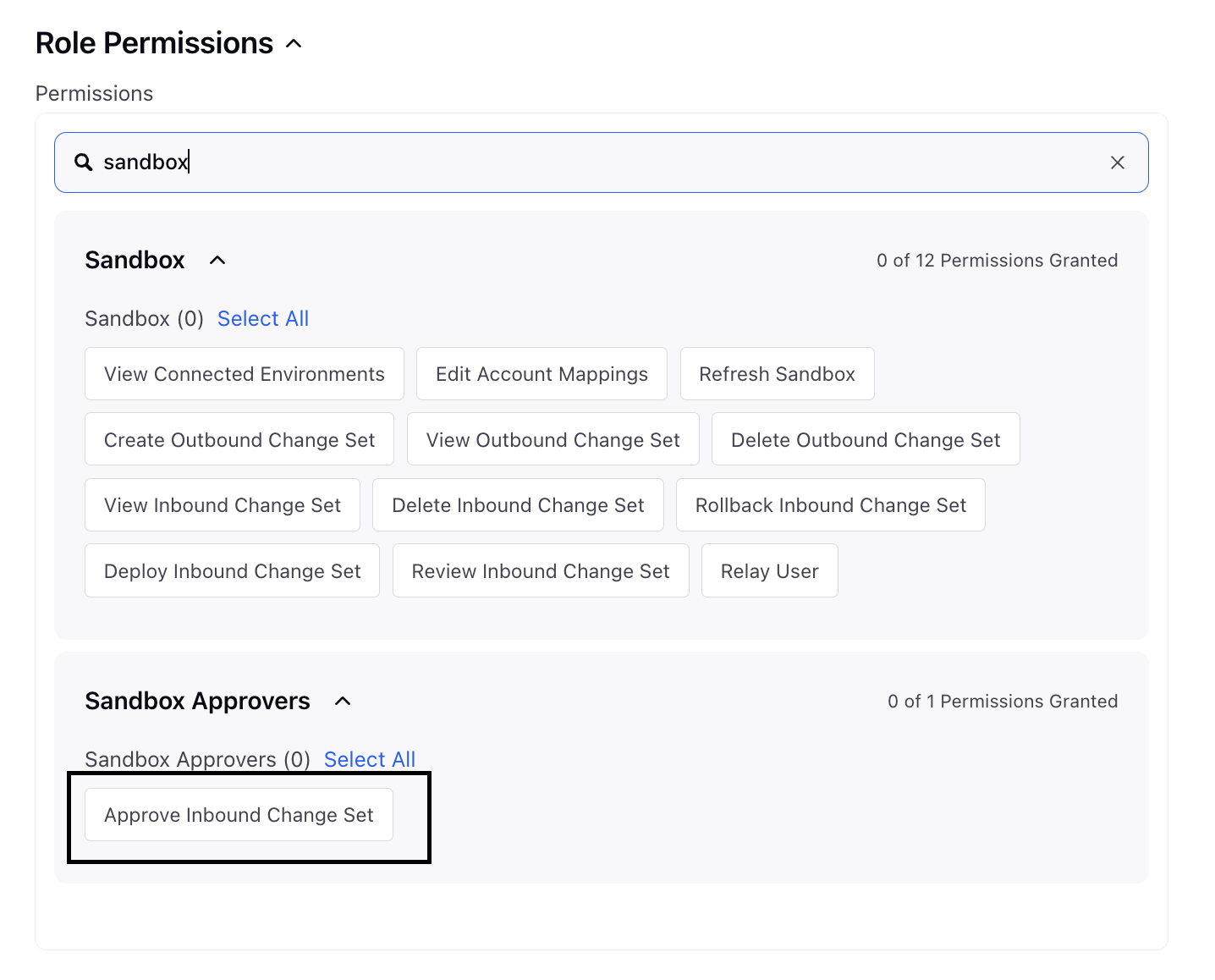
The ability to approve a changeset deployment or refresh is governed by a permission called Sandbox Approvers that is separate from existing Sandbox permissions.
Only users with this designated permission can deploy changesets.
For other users without Sandbox Approvers permission, the Review and Deploy button will be disabled.
Access Inbound ChangeSets
Navigate to Launchpad. Under the Platform Modules, click All Settings within Settings.
On the Settings window, under General, click Sandbox Manager from the left pane and select Inbound Change Sets.
All incoming ChangeSets appear here with their current status.
Review and Deploy an Inbound ChangeSet
Step 1: Open the ChangeSet
When an inbound ChangeSet is received:
It appears with a New status.
Click the three‑dot menu next to the ChangeSet.
Select Review and Deploy.

Step 2: Review Conflicts (If Any)
When you click Review and Deploy, a side panel opens.
If there are versioning or validation conflicts, they appear in the Review Conflicts tab.
If no conflicts are detected, the page indicates that there are no versioning errors.
For each conflict, you must choose one of the following:
Acknowledge – Accept the change and proceed
Skip – Exclude the entity from deployment
You must acknowledge or skip all conflicts before proceeding.
Once conflicts are resolved, the approvers can either Approve or Reject the changeset using Approve and Reject buttons available on top of the Review Conflicts page.

Step 3: Preview the ChangeSet (Optional)
If you want to review changes in detail:
Click Preview.
Select Generate Preview.
After a few seconds:
A notification appears when the preview is ready.
You can:
View changes directly in the UI, or
Download the Excel preview file from the Notifications panel.
The preview shows:
Entities being changed
Configuration differences
Optional AI‑generated summary (where available)

Submit for Approval or Deploy
Once conflicts are resolved, the Submit for Approval button becomes active.
Approval Path Behavior
If no approval path is configured or activated in your environment:
The ChangeSet is automatically deployed after submission.
If one or more approval paths are active:
You must select an approval path before submitting.
After submission:
The ChangeSet enters the approval workflow.
Each approver is notified and must approve or reject the ChangeSet using the Approve and Reject button available on top of the Review Conflicts page.
Approval Flow
Approvals follow the configured approval path sequence.
Each approver can:
Review acknowledged and skipped entities
Approve to move the ChangeSet to the next approver
Reject to stop the process
If any approver rejects the ChangeSet:
The ChangeSet status is marked Rejected
The approval process ends
The ChangeSet is not deployed
If all approvers approve:
The ChangeSet is automatically deployed
 Note: As a best practice:
Assign approval permissions to Admin users
Limit approval access to a small, trusted group
This helps maintain governance, accountability, and deployment safety.
Final Deployment
After the final approval:
The ChangeSet is deployed automatically
The status updates to Deployed
Changes take effect in the target environment
Summary
The ChangeSet Approval and Deployment process provides:
A simpler, unified review flow
Clear conflict handling
Flexible approval paths
Strong governance through permissions and best practices