Leveraging Macros to Maximize Workflow Efficiency
Updated
How Macros help you save the unnecessary number of clicks to supercharge the productivity of your agents.
Macros are used to execute multiple actions on an entity with a single click. It allows you to make multiple changes to entities at once, creating efficiencies in your workflows.
Macro-level actions that users can perform are determined based on the Macro Permissions.
Note: You can create Macros only at the Workspace level. |
Navigate to Macros
Click Launchpad or click New Tab . Under the Platform Modules, select All Settings within Settings.
From the left pane, expand General Settings and then select Macros. You can also search for it in the search bar above.
Overview of Macros
On the Macros window, you can perform various actions.
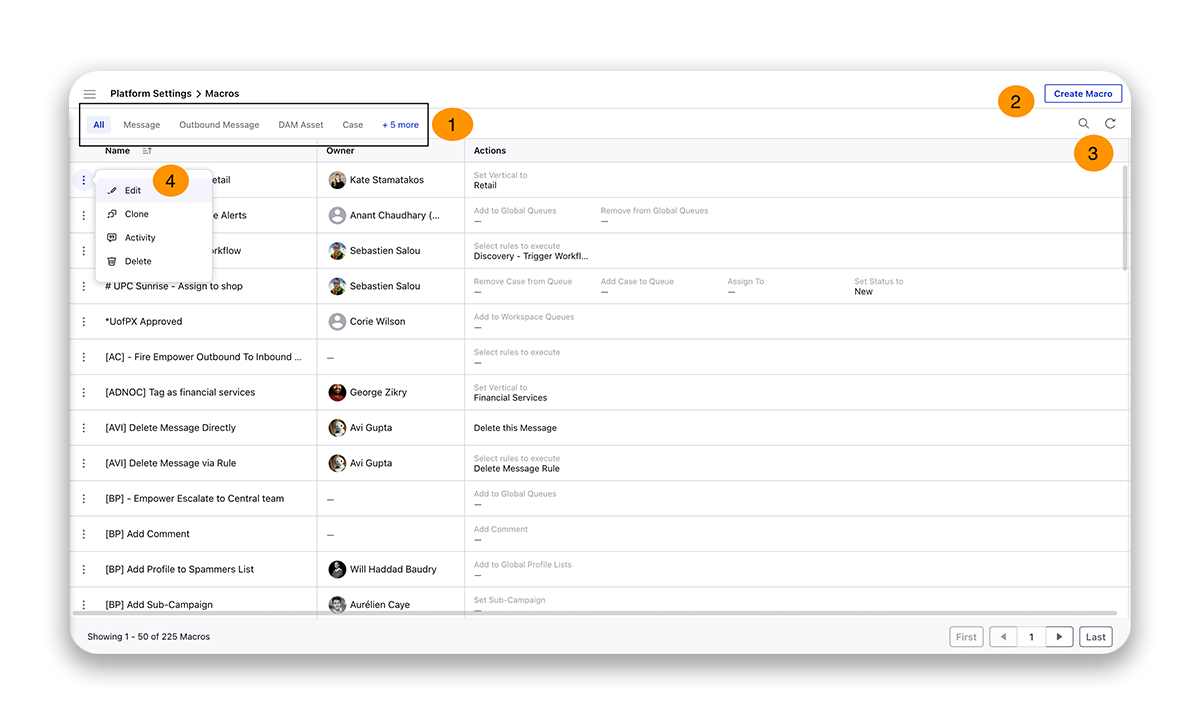
# | Term | Description | ||||||||
1 | Case | |||||||||
2 | Create a new Macro. | |||||||||
3 | Search - Search for a specific Macro by typing in keywords. Refresh - Refresh the dashboard to see the most up-to-date view. | |||||||||
4 | Take actions on the created Macro.
|