Agent Performance Voice

Updated 

An Agent Performance Report provides detailed insights into an individual agent's work metrics and efficiency. It typically includes data such as the number of cases handled, response times, resolution times, customer satisfaction scores, and other key performance indicators (KPIs). This report helps evaluate an agent's overall effectiveness and identify areas for improvement or training.

Scenarios to use Agent Performance Voice Report

  • Evaluating Efficiency: Helps assess how quickly and effectively agents handle cases, identifying top performers and areas for improvement.

  • Identifying Training Needs: Pinpoints areas where agents may need additional training based on performance metrics like response and resolution times.

  • Performance Reviews: Provides data-driven insights for agent performance reviews, feedback sessions, and goal setting by evaluating the number of calls handled and Average Handling Time (AHT).

  • Customer Satisfaction Tracking: Monitors customer feedback and satisfaction scores to ensure quality service and identify any issues.

  • Optimizing Staffing: Assists in balancing workloads and ensuring optimal resource allocation based on agent performance trends.

Dashboard Sections

  • Performance Overview: The Performance Overview tab provides a concise summary of key metrics, offering a quick snapshot of an agent's overall performance.

  • Inbound: The Inbound Call Summary is a report provides an overview of key metrics related to inbound calls handled by agents. This summary helps assess the efficiency and effectiveness of agents in handling inbound customer inquiries and can be used to identify trends, areas for improvement, or to measure overall team performance.

  • Outbound: An Outbound Call Summary provides an overview of all outbound calls made by agents, including key metrics like total calls made, talk time, call outcomes (successful, abandoned, or unanswered), and agent performance. It also tracks conversion rates, call distribution across agents, and any trends related to abandoned calls.

  • Raw Data: The raw data report provides detailed insights into agent performance across all metrics.

  • Transfer Data: Provides information about the detailed transfer log.

The various metrics are listed below:

There are 8 different types of reports that you can visualise in the Performance Overview Report:

Let's have a look at the metrics:

Name

Description

Number of Offered Calls

The Number of Calls refers to the total count of calls offered to the agent, including both inbound and outbound calls.

Number of Connected Calls

Number of calls where agent and customer both connected on the call including inbound and outbound calls dialed.

Number of Abandoned Calls

Number of abandoned calls where customer didn't connect in case of outbound calls and agent didn't connect in case of inbound calls post offer was made to the agent.

% Connected Calls

% of calls connected over total number of offered calls with respect to the particular agent.

Pending ACW Count

Pending ACW for Calls Eligible for ACW.

Average Handle Time

Average of total handle time as per values selected in "Standard Metrics Screen" over total number of connected calls.

The metrics are listed below:

Name

Description

Number of Offered Calls

Number of calls which were offered to the agent inc both inbound and outbound calls.

Number of Connected Calls

Number of calls where agent and customer both connected on the call including inbound and outbound calls dialed.

The metrics are listed below:

Name

Description

Average Queue Time

Total time spent by the agent in a Queue before assignment. This is applicable to both Inbound & Outbound Calls.

Average Inbound Ring Time

Average Inbound Ring Time based on number of inbound calls which were offered to the agent.

Average Outbound Ring Time

Average time call rang on agent console for outbound calls where customer first connected on the call

Average Talk Time

Total time spent by agents talking on the call / Number of connected calls.

Average Hold Time

Total time spent by agents on hold / Number of Connected Calls.

Average ACW Time

Average time the agent took to fill the after call wrap up form on the interaction assigned to the agent. It is based on overall interactions handled. This is calculated for all voice cases/ calls only.

The metrics are listed below:

Name

Description

Agent

The sprinklr user for whom the report is being generated.

Average Handle Time

Average of total handle time as per values selected in "Standard Metrics Screen" over total number of connected calls.

Highlights agents who manage the highest number of both inbound and outbound calls. This metric helps recognize agents with high call volumes, showcasing their productivity and ability to handle large workloads effectively.

Some of the Key Metrics are:

Name 

Definition 

Agent

The sprinklr user for whom the report is being generated.

Number of Connected Calls 

The number of calls where both the agent and customer successfully connected, including both inbound and outbound calls.  

Number of Inbound Connected Calls 

The number of inbound calls where both the agent and customer successfully connected.  

Number of Outbound Connected Calls: 

The number of outbound calls where both the agent and customer successfully connected. 

Identifies agents who complete the most After-Call Work (ACW) tasks. This metric highlights agent who efficiently handle their post-call responsibilities, ensuring accurate and timely documentation or follow-up actions.

Let's have a look at the metrics:

Name

Description

Agent

The sprinklr user for whom the report is being generated.

Disposition Count

Number of dispositions that is filled by the particular agent.

The metrics are listed below:

Name

Description

Agent

The sprinklr user for whom the report is being generated.

Pending Disposition Count

Number of dispositions that is filled by the particular agent.

This graph tracks the daily count of unique agents actively handling calls, whether inbound or outbound.

Let's have a look at the metrics:

Name

Description

Date

Date on which event occurred.

Unique Agents (Agents)

Number of agents who have been offered atleast 1 call in the selected time duration.

To analyze inbound call performance, the user can click on the Inbound Tab. Within this tab, the Inbound Calls Summary provides a detailed table.

Let usdeep dive into all the widgets:

The metrics are listed below:

Name

Description

Number of Offered Calls

Number of calls which were offered to the agent inc both inbound and outbound calls.

Number of Connected Calls

Number of calls where agent and customer both connected on the call including inbound and outbound calls dialed.

Number of Abandoned Calls

Number of abandoned calls where customer didn't connect in case of outbound calls and agent didn't connect in case of inbound calls post offer was made to the agent.

% Connected Calls

% of calls connected over total number of offered calls with respect to the particular agent.

Pending ACW Count

Pending ACW for Calls Eligible for ACW.

Average Handle Time

Average of total handle time as per values selected in "Standard Metrics Screen" over total number of connected calls.

The metrics are listed below:

Name

Description

Number of Offered Calls

Number of calls which were offered to the agent inc both inbound and outbound calls.

Number of Connected Calls

Number of calls where agent and customer both connected on the call including inbound and outbound calls dialed.

The metrics are listed below:

Name

Description

Average Queue Time

Total time spent by the agent in a Queue before assignment. This is applicable to both Inbound & Outbound Calls.

Average Inbound Ring Time

Average Inbound Ring Time based on number of inbound calls which were offered to the agent.

Average Talk Time

Total time spent by agents talking on the call / Number of connected calls.

Average Hold Time

Total time spent by agents on hold / Number of Connected Calls.

Average ACW Time

Average time the agent took to fill the after call wrap up form on the interaction assigned to the agent. It is based on overall interactions handled. This is calculated for all voice cases/ calls only.

Hold Count

Number of times customer was put on hold for the call by an agent.

The metrics are listed below:

Name

Description

Date

Date on which event occurred.

% connected calls

% of calls connected over total number of offered calls with respect to the particular agent.

The metrics are listed below:

Name

Description

Date

Date on which event occurred.

Number of Offered Calls

Number of calls which were offered to the agent inc both inbound and outbound calls.

Number of Connected Calls

Number of calls where agent and customer both connected on the call including inbound and outbound calls dialed.

Number of Abandoned Calls

Number of abandoned calls where customer didn't connect in case of outbound calls and agent didn't connect in case of inbound calls post offer was made to the agent.

% Connected Calls

% of calls connected over total number of offered calls with respect to the particular agent.

Total Ring Time

Total time call spends ringing on an agents console, post offer is made to the agent - for both Inbound & Outbound Calls.

Average Ring Time

Average Inbound Ring Time based on number of inbound calls which were offered to the agent.

Total Talk Time

Total talk time of the agents on the calls.

Average Talk Time

Total time spent by agents talking on the call / Number of connected calls.

Total Hold Time

Total time for which customer was put on hold.

Average Hold Time

Total time spent by agents on hold / Number of Connected Calls.

Total ACW Time

Time spent filling the ACW by the agent based on values selected in "Standard Metrics Screen".

Average ACW Time

Average time the agent took to fill the after call wrap up form on the interaction assigned to the agent. It is based on overall interactions handled. This is calculated for all voice cases/ calls only.

Total Handle Time

Depicts the total handle time of the conversation including the talk time, hold time, preview time, wrap time etc based on metrics selected in the "Standard Metrics Screen".

Average Handle Time

Average of total handle time as per values selected in "Standard Metrics Screen" over total number of connected calls.

Mute Time (Agent)

Total time call was put on mute by the agent.

Average Mute Time

Time spent on mute by the agent / Number of connected calls.

Hold Count (Agent)

Number of times customer was put on hold for the call by an agent.

Pending ACW Count

Pending ACW for Calls Eligible for ACW.

IVR Transfers Initiated

Total IVR transfers which an agent initiated.

Transfers Initiated

Total number of warm and blind transfers initiated by the agent on the call to queue or directly to the agent.

Blind Transfers Initiated

Total number of blind transfers iniatied by the agent on the call inc both the transfer directly to agent or to the queue.

Warm Transfers Initiated

Total number of warm transfers iniatied by the agent on the call inc both the transfer directly to agent (irrespective of if the call was answered by agent or not) or to the queue.

Transfers Received

Total number of warm and blind transfers received by the agent on the call i.e for warm transfer -> the call rang on the agent console irrespective of if the call was accepted by the agent later or not and for blind transfer -> call was accepted and connected post the ring on agent console.

Blind Transfers Received

Total number of blind transfers received by the agent on the call and also accepted by the agent (will be counted only if the agent is connected).

Warm Transfers Received

Total number of warm transfers received by the agent on the call i.e it gets counted if either the call rings on agent console or agent connects on the call (consult call) or agent is successfully transferred the full control of the call (successful transfer call).

The metrics are listed below:

Name

Description

Call Disposition

Depicts the disposition field that is filled by the agent while filling the ACW or Disposition Form.

Call Sub Disposition

Depicts the sub-disposition that is filled by the agent while filling the ACW or Disposition Form.

Number of Connected Calls

Number of calls where agent and customer both connected on the call including inbound and outbound calls dialed.


Let's understand the metrics. This summary helps evaluate the efficiency and effectiveness of outbound calling efforts.

The metrics are listed below:

Name

Description

Number of Outbound Offered Calls

Number of calls where agent and customer both connected on the call including inbound and outbound calls dialed

Number of Outbound Connected Calls

Number of calls where agent and customer both connected on the call for just outbound calls.

% Connected Calls

% of calls connected over total number of offered calls with respect to the particular agent.

Number of Abandoned Calls

Number of abandoned calls where customer didn't connect in case of outbound calls and agent didn't connect in case of inbound calls post offer was made to the agent.

Pending ACW Count

Pending ACW for Calls Eligible for ACW.

Average Handle Time

Average of total handle time as per values selected in "Standard Metrics Screen" over total number of connected calls.

The metrics are listed below:

Name

Description

Number of Offered Calls

Number of calls which were offered to the agent inc both inbound and outbound calls.

Number of Connected Calls

Number of calls where agent and customer both connected on the call including inbound and outbound calls dialed.

The metrics are listed below:

Name

Description

Average Outbound Ring Time

Average time call rang on agent console for outbound calls where customer first connected on the call.

Average Preview Time

Average of Preview Time (Agent) based on number of preview calls dialed out from the system (only for outbound calls).

Average Talk Time

Total time spent by agents talking on the call / Number of connected calls.

Average Hold Time

Total time spent by agents on hold / Number of Connected Calls.

Average ACW Time

Average time the agent took to fill the after call wrap up form on the interaction assigned to the agent. It is based on overall interactions handled. This is calculated for all voice cases/ calls only.

Avg. of Manual Call Pre-Call Prep Time (Agent).

Total time spent by the agent preparing before the manual call.

Avg. of Customer Dial Time (Agent)

Time spent by the agent on the outbound call when its ringing to the customer i.e agent is connected and waiting for customer to join the calls (in case of manual, preview calls).

Hold Count

Number of times customer was put on hold for the call by an agent.

The metrics are listed below:

Name

Description

Date

Date on which event occurred.

% Connected Call

% of calls connected over total number of offered calls with respect to the particular agent.

Let's have a look at the metrics of the outbound call summary:

Metrics

Description

Date

Date on which event occurred.

Agent

The sprinklr user for whom the report is being generated.

Number of Offered Calls

Number of calls which were offered to the agent including both inbound and outbound calls.

Number of Connected Calls

The number of calls refers to the total count of calls where both the agents and the customer are successfully connected, including both inbound and outbound calls.

Number of Dialer Calls Attempted

Number of outbound dialer calls which were attempted by the agent.

Number of Dialer Calls Connected

The number of outbound dialer attempted calls connected by the customer refers to the total count of outbound calls made by the dialer where both the agent and the customer are successfully connected on the call.

Number of Manual Calls Attempted

Number of outbound manual calls which were attempted by the agent.

Number of Manual Calls Connected

The number of outbound dialer attempted calls connected by the customer refers to the total count of outbound calls made by the dialer that were successfully answered by the customer, resulting in a connection between both the agent and the customer.

Number of Schedule Callbacks Attempted

Number of outbound scheduled callbacks calls which were attempted by the agent.

Number of Schedule Call Backs Connected

The number of outbound schedule callbacks attempted calls that were connected by the customer, i.e., both agent and customer connected on the call.

Number of Not Connected Calls

Number of abandoned calls where customer didn't connect in case of outbound calls and agent didn't connect in case of inbound calls post offer was made to the agent.

% Connected Calls

Measures the percentage of calls connected over the total number of offered calls with respective to the particular agent.

Manual Call Pre-Call Prep Time (Agent)

Total time spent by the agent preparing before the manual call.

Total Preview Time

Indicates the total time spent by the agent on calls in case of outbound calls.

Average Preview Time

The Average Preview Time (Agent) is calculated based on the total preview time spent by the agent on outbound calls divided by the number of preview calls dialled out from the system. This metric reflects the average amount of time an agent spends previewing a call before dialing out, specifically for outbound calls.

Total Customer Dial Time

Time spent by the agent on the outbound call when its ringing to the customer i.e agent is connected and waiting for customer to join the calls (in case of manual, preview calls).

Average Customer Dial Time

Time spent by the agent on the outbound call when its ringing to the customer i.e agent is connected and waiting for customer to join the calls (in case of manual, preview calls).

Total Ring Time

In both outbound and inbound calls, the agent spent time connecting on the call after the offer was made to the agent.

Average Ring Time

Average time call rang on agent console for outbound calls where the customer first connected on the call.

Average Talk Time

The total time spent by agents talking on the call is divided by the number of connected calls.

Average Hold Time

Time spent by the agent on hold divided by the number of calls connected.

Total ACW Time

Time spent filling the ACW by the agent based on values selected in service settings screen.

Average ACW Time

Time spent filling the ACW by the agent based on values selected in the service settings screen.

Total Customer Dial Time

Time spent by the agent on the call when the agent has connected to the call, but the customer is yet to join the call.

Total Handle Time

Depicts the total handle time of the conversation including the talk time, hold time, preview time, wrap time etc based on metrics selected in the service settings screen.

Average Handle Time

Average of total handle time as per values selected in "service settings screen" over total number of connected calls.

Mute Time (Agent)

Total time call was put on mute by the agent.

Average Mute Time

Time spent on mute by the agent / Number of connected calls.

Hold Count (Agent)

Number of times customer was put on hold for the call by an agent

Transfers Initiated

Total number of warm and blind transfers initiated by the agent on the call to queue or directly to the agent.

Blind Transfers Initiated

Total number of blind transfers initiated by the agent on the call including transfers directly to agent or to the queue.

Warm Transfers Initiated

Total number of warm transfers iniatied by the agent on the call that includes transfers directly to agent (irrespective of if the call was answered by agent or not) or to the queue.

Transfers Received

A total number of warm and blind transfers received by the agent on the call, i.e. for warm transfer the call rang on the agent console irrespective of if the call was accepted by the agent later or not, and for blind transfer, -> call was accepted and connected post the ring on agent console.

Blind Transfers Received

The total number of warm and blind transfers received by the agent on the call includes both types of transfers. For a warm transfer, the call rang on the agent's console, regardless of whether the agent accepted it later. For a blind transfer, the call was accepted and connected by the agent after ringing on the console. This metric tracks the total instances of both types of transfers received by the agent.

Warm Transfers Received

The total number of warm transfers received by the agent refers to instances where the call either rings on the agent's console, the agent connects to the call (consult call), or the agent successfully takes full control of the call after the transfer (successful transfer call). This metric tracks all scenarios involving the agent in a warm transfer.

Pending ACW Count

It depicts the pending ACW for the calls eligible for ACW.

The metrics are added below:

Name

Description

Agent

The sprinklr user for whom the report is being generated.

Number of Offered Calls

Number of calls which were offered to the agent inc both inbound and outbound calls.

Number of Connected Calls

Number of calls where agent and customer both connected on the call including inbound and outbound calls dialed.

Number of Dialer Calls Connected

Number of outbound dialer attempted calls which were connected by customer i.e both agent and customer connected on the call.

Number of Manual Calls Attempted

Number of outbound manual calls which were attempted by the agent.

Number of Manual Calls Connected

Number of outbound manual calls which were attempted by the agent and customer connected on the calls i.e agent and customer both connected on the call.

Number of Schedule Callbacks Attempted

Number of outbound scheduled callbacks calls which were attempted by the agent.

Number of Schedule Callbacks Connected

Number of outbound schedule callbacks attempted calls which were connected by customer i.e both agent and customer connected on the call.

Number of Not Connected Calls

Number of abandoned calls where customer didn't connect in case of outbound calls and agent didn't connect in case of inbound calls post offer was made to the agent.

% Connected Calls

% of calls connected over total number of offered calls with respect to the particular agent.

Manual Call Pre-Call Prep Time (Agent)

Total time spent by the agent preparing before the manual call.

Total Preview Time

Indicates the preview time spent by the agent on call in cases of outbound call.

Average Preview Time

Average of Preview Time (Agent) based on number of preview calls dialed out from the system (only for outbound calls).

Total Customer Dial Time

Time spent by the agent on the outbound call when its ringing to the customer i.e agent is connected and waiting for customer to join the calls (in case of manual, preview calls).

Average Customer Dial Time

Time spent by the agent on the outbound call when its ringing to the customer i.e agent is connected and waiting for customer to join the calls (in case of manual, preview calls).

Total Ring Time

Total time call spends ringing on an agents console, post offer is made to the agent - for both Inbound & Outbound Calls.

Average Ring Time

Average time call rang on agent console for outbound calls where customer first connected on the call.

Average Talk Time

Total time spent by agents talking on the call / Number of connected calls.

Average Hold Time

Total time spent by agents on hold / Number of Connected Calls.

Total ACW Time

Time spent filling the ACW by the agent based on values selected in "Standard Metrics Screen".

Average ACW Time

Average time the agent took to fill the after call wrap up form on the interaction assigned to the agent. It is based on overall interactions handled. This is calculated for all voice cases/ calls only.

Total Handle Time

Depicts the total handle time of the conversation including the talk time, hold time, preview time, wrap time etc based on metrics selected in the "Standard Metrics Screen".

Average Handle Time

Average of total handle time as per values selected in "Standard Metrics Screen" over total number of connected calls

Mute Time (Agent)

Total time call was put on mute by the agent.

Average Mute Time

Time spent on mute by the agent / Number of connected calls.

Hold Count (Agent)

Number of times customer was put on hold for the call by an agent.

Pending ACW Count

Pending ACW for Calls Eligible for ACW.

Transfers Initiated

Total number of warm and blind transfers initiated by the agent on the call to queue or directly to the agent.

Blind Transfers Initiated

Total number of blind transfers iniatied by the agent on the call inc both the transfer directly to agent or to the queue.

Warm Transfers Initiated

Total number of warm transfers iniatied by the agent on the call inc both the transfer directly to agent (irrespective of if the call was answered by agent or not) or to the queue.

Transfers Received

Total number of warm and blind transfers received by the agent on the call i.e for warm transfer -> the call rang on the agent console irrespective of if the call was accepted by the agent later or not and for blind transfer -> call was accepted and connected post the ring on agent console.

Blind Transfers Received

Total number of blind transfers received by the agent on the call and also accepted by the agent (will be counted only if the agent is connected).

Warm Transfers Received

Total number of warm transfers received by the agent on the call i.e it gets counted if either the call rings on agent console or agent connects on the call (consult call) or agent is successfully transferred the full control of the call (successful transfer call).

The metrics are mentioned below:

Name

Description

Call Disposition

Depicts the disposition field that is filled by the agent while filling the ACW or Disposition Form.

Call Sub-Disposition

Depicts the sub-disposition that is filled by the agent while filling the ACW or Disposition Form.

Number of Connected Calls

Number of calls where agent and customer both connected on the call including inbound and outbound calls dialed.

It also includes information on whether the call was inbound or outbound, along with the customer’s phone number and a breakdown of the call count for both inbound and outbound calls along with other metrics.

The metrics are listed below:

Name

Description

Date

Date on which event occurred.

Agent

The sprinklr user for whom the report is being generated.

Agent ID

The sprinklr user ID for whom the report is being generated.

Agent Email ID

Email ID of the user.

Call Start Time

Timestamp when the particular call started.

Conversation ID

Indicates the unique ID associated with that particular call. There can be multiple calls associated to a case, and each call will have a separate and unique conversation ID.

Case Details

Associated case to the event, which includes the Case subject, Case ID and the Description.

Direction

Indicates the direction of the call with respect to the customer. If the call is dialed in by customer it will be termed as inbound and if the call is dialed out by the sprinklr agent it will be termed as outbound.

Customer Phone Number

Depicts the phone number of the customer associated to the call.

Contact Centre Phone Number

This will indicate the contact centre phone number from where the call is initiated (outbound - manual/ preview) or where the call is received (inbound and outbound predictive).

Number of Offered Calls

Number of calls which were offered to the agent inc both inbound and outbound calls.

Number of Connected Calls

Number of calls where agent and customer both connected on the call including inbound and outbound calls dialed.

Number of Abandoned Calls

Number of abandoned calls where customer didn't connect in case of outbound calls and agent didn't connect in case of inbound calls post offer was made to the agent.

Total Ring Time

Total time call spends ringing on an agents console, post offer is made to the agent - for both Inbound & Outbound Calls.

Talk Time (Agent)

Total talk time of the agents on the calls.

Hold Time (Agent)

Total time for which customer was put on hold.

Total ACW Time

Time spent filling the ACW by the agent based on values selected in "Standard Metrics Screen".

Total Handle Time

Depicts the total handle time of the conversation including the talk time, hold time, preview time, wrap time etc based on metrics selected in the "Standard Metrics Screen".

Mute Time (Agent)

Total time call was put on mute by the agent.

Hold Count (Agent)

Number of times customer was put on hold for the call by an agent.

Call Disposition

Depicts the disposition field that is filled by the agent while filling the ACW or Disposition Form.

Call Sub-Disposition

Depicts the sub-disposition that is filled by the agent while filling the ACW or Disposition Form.

Work Queue

The name of the Work Queue of which the particular call assigned to the agent was a part of or assigned from. In case the call transfers and multiple agents connected on the call, this will create multiple rows corresponding to each queue and agent combination.

Conversation Completion Status

This specify about the status of the call after it ends. For example - AGENT_NO_ANSWER, CUSTOMER_REJECTED, COMPLETED etc.

Voice Application

Name of the voice application configured in the system to receive or dial out the calls of the centre.

Call End Time

This will indicate the call end or disconnect time irrespective of if agent and customer connected on call.

Transfers Initiated (Blind/Warm)

Total number of warm and blind transfers initiated by the agent on the call to queue or directly to the agent.

Warm Transfers Initiated

Total number of warm transfers iniatied by the agent on the call inc both the transfer directly to agent (irrespective of if the call was answered by agent or not) or to the queue.

Blind Transfers Initiated

Total number of blind transfers iniatied by the agent on the call inc both the transfer directly to agent or to the queue.

Transfers Received (Blind/Warm)

Total number of warm and blind transfers received by the agent on the call i.e for warm transfer -> the call rang on the agent console irrespective of if the call was accepted by the agent later or not and for blind transfer -> call was accepted and connected post the ring on agent console.

Warm Transfers Received

Total number of warm transfers received by the agent on the call i.e it gets counted if either the call rings on agent console or agent connects on the call (consult call) or agent is successfully transferred the full control of the call (successful transfer call).

Blind Transfers Received

Total number of blind transfers received by the agent on the call and also accepted by the agent (will be counted only if the agent is connected).

IVR Transfer Initiated

Total IVR transfers which an agent initiated.

External Transfers Initiated (Agent)

Number of times an external user or number is added to an ongoing call, either through the 'Add to Call' feature or via 'Transfer'. Note: This metric is counted at the time of initiation, regardless of whether the external party successfully connects or not.

The metrics are listed below:

Name

Description

Date

Date on which event occurred.

Agent

The sprinklr user for whom the report is being generated.

Agent ID

The sprinklr user ID for whom the report is being generated.

Agent Email ID

Email ID of the user.

Call Start Time

Timestamp when the particular call started.

Conversation ID

Indicates the unique ID associated with that particular call. There can be multiple calls associated to a case, and each call will have a separate and unique conversation ID.

Case Details

Associated case to the event, which includes the Case subject, Case ID and the Description.

Direction

Indicates the direction of the call with respect to the customer. If the call is dialed in by customer it will be termed as inbound and if the call is dialed out by the sprinklr agent it will be termed as outbound.

Customer Phone Number

Depicts the phone number of the customer associated to the call.

Dialer Type

Shows in case of outbound calls - the type of the call like predictive, progressive, external, acw callbacks, callbacks and so on. In case of inbound calls it shows a blank.

Number of Offered Calls

Number of calls which were offered to the agent inc both inbound and outbound calls.

Number of Connected Calls

Number of calls where agent and customer both connected on the call including inbound and outbound calls dialed.

Number of Abandoned Calls

Number of abandoned calls where customer didn't connect in case of outbound calls and agent didn't connect in case of inbound calls post offer was made to the agent.

Total Ring Time

Total time call spends ringing on an agents console, post offer is made to the agent - for both Inbound & Outbound Calls.

Total Manual Call Pre-Call Prep Time

Total time spent by the agent preparing before the manual call.

Total Preview Time

Indicates the preview time spent by the agent on call in cases of outbound call.

Total Customer Dial Time

Time spent by the agent on the outbound call when its ringing to the customer i.e agent is connected and waiting for customer to join the calls (in case of manual, preview calls).

Talk Time (Agent)

Total talk time of the agents on the calls.

Hold Time (Agent)

Total time for which customer was put on hold.

Total ACW Time

Time spent filling the ACW by the agent based on values selected in "Standard Metrics Screen".

Total Handle Time

Depicts the total handle time of the conversation including the talk time, hold time, preview time, wrap time etc based on metrics selected in the "Standard Metrics Screen".

Mute Time (Agent)

Total time call was put on mute by the agent.

Hold Count (Agent)

Number of times customer was put on hold for the call by an agent.

Call Disposition

Depicts the disposition field that is filled by the agent while filling the ACW or Disposition Form.

Call Sub-Disposition

Depicts the sub-disposition that is filled by the agent while filling the ACW or Disposition Form.

Work Queue

The name of the Work Queue of which the particular call assigned to the agent was a part of or assigned from. In case the call transfers and multiple agents connected on the call, this will create multiple rows corresponding to each queue and agent combination.

Conversation Completion Status

This specify about the status of the call after it ends. For example - AGENT_NO_ANSWER, CUSTOMER_REJECTED, COMPLETED etc.

Voice Application

Name of the voice application configured in the system to receive or dial out the calls of the centre.

Call End Time

This will indicate the call end or disconnect time irrespective of if agent and customer connected on call.

Transfers Initiated (Blind/Warm)

Total number of warm and blind transfers initiated by the agent on the call to queue or directly to the agent.

Warm Transfers Initiated

Total number of warm transfers iniatied by the agent on the call inc both the transfer directly to agent (irrespective of if the call was answered by agent or not) or to the queue.

Blind Transfers Initiated

Total number of blind transfers iniatied by the agent on the call inc both the transfer directly to agent or to the queue.

Transfers Received (Blind/Warm)

Total number of warm and blind transfers received by the agent on the call i.e for warm transfer -> the call rang on the agent console irrespective of if the call was accepted by the agent later or not and for blind transfer -> call was accepted and connected post the ring on agent console.

Warm Transfers Received

Total number of warm transfers received by the agent on the call i.e it gets counted if either the call rings on agent console or agent connects on the call (consult call) or agent is successfully transferred the full control of the call (successful transfer call).

Blind Transfers Received

Total number of blind transfers received by the agent on the call and also accepted by the agent (will be counted only if the agent is connected).

External Transfers Initiated (Agent)

Number of times an external user or number is added to an ongoing call, either through the 'Add to Call' feature or via 'Transfer'. Note: This metric is counted at the time of initiation, regardless of whether the external party successfully connects or not.

The metrics are listed below for Detailed Transfer Log:

Name

Description

Date

Date on which event occurred.

Case Details

Associated case to the event, which includes the Case subject, Case ID and the Description.

Case Number

The ID number associated to the Case Details.

Conversation ID

Indicates the unique ID associated with that particular call. There can be multiple calls associated to a case, and each call will have a separate and unique conversation ID.

Call Start Time

Timestamp when the particular call started

Work Queue

Provides the name of the associated work queue. In case the work queue is not shared with the particular user, it will show the unique ID of the queue.

Customer Phone Number

Depicts the phone number of the customer associated to the call.

Customer

Profile name of the customer associated to the case (This can be the name, phone number of profile ID of the customer based on what is captured during case creation).

Transfer Count

Number of transfers that were initiated by the agent i.e count of any transfer related activity including warm, blind, add to call, IVR transfers etc.

Call Transfer Initiator

Details of the user who initiated the transfer.

Transfer Initiated At

Timestamp indicating when the transfer was initiated.

Call Transfer Initiator ID

Sprinklr ID of the user who has initiated the transfer.

Type of transfer

Type of transfer initiated - Warm/Blind/Queue/IVR.

Call Transferred To

Details of where the call was transferred to. (It may include Agent, Queue, IVR, Add to Call, or External.).

Transferred Picked Up At

Timestamp of when the transfer was received/completed.

Call Transfer Receiver (Agent)

Details of the user who received the transfer. In case of direct agent transfers, this will show the user selected while transferring. In case of queue transfers this will show the user connected after the transfer.

Call Transfer Receiver ID (Agent)

Sprinklr ID of the user based on Call Transfer Receiver (Agent).

Transferred Work Queue

The name of the work queue to which the call has been transferred to (in cases of queue transfer) - primary queue to which the call is transferred to.

Transferred Work Queue ID

Queue ID of the work queue to which the call was transferred (in case of queue transfer).

Transferred IVR Name

Name of the IVR where the call has been transferred (in case of IVR transfer).

Transferred IVR ID

IVR ID where the call has been transferred (in case of IVR transfer).

Call Transfer Receiver (External)

Details of the external transfer phone number (in case of external transfer).

Skill Selected While doing Transfer (Csv)

Value(s) of the skill(s) selected on the UI when initiating the transfer, presented as a comma-separated value.

Was Transferred Successfully?

A boolean field indicating whether the transfer was successful or failed based on if the agent connected on the call or not.

Was Warm Transferred Successfully?

A boolean field indicating whether the warm transfer was finally completed (i.e after consult the call was completely transferred to the receiver agent). In all other cases, it will show as NA.

Final Warm Transfer Time

Timestamp indicating the final transfer time after the consult in cases of warm transfers (i.e after consult the call was completely transferred to the receiver agent). In all other cases, it will show as NA.

Warm Cancelled Transfer Timestamp

Timestamp indicating the time when agent canceled the warm transfer.

Agent Transfer Index

This field denotes the order of transfers, i.e. from 1 to n, that is the sequence in which transfers have occurred on the call.

Manage Dashboard

Date Range Section

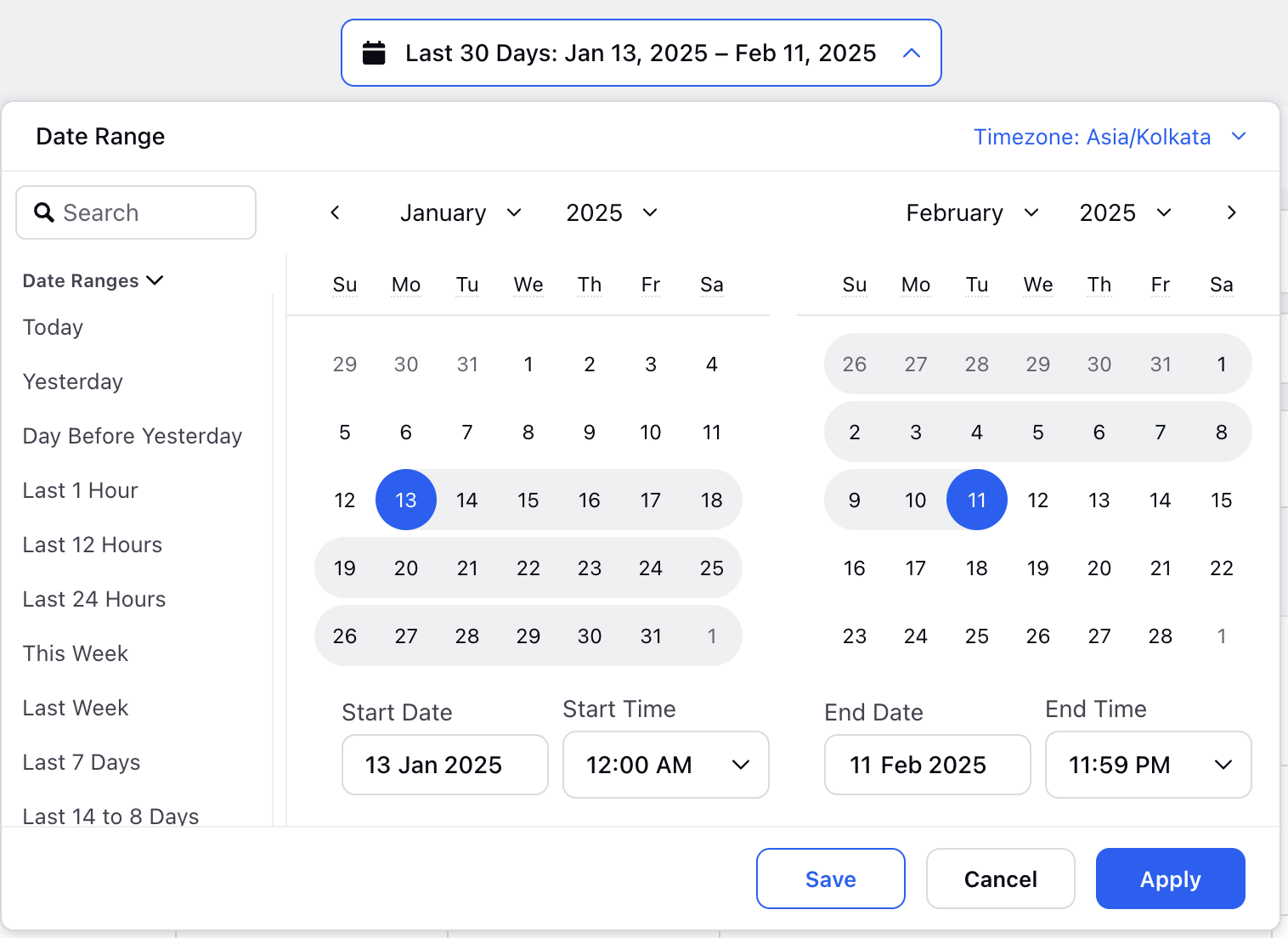
A date range selector allows you to choose the period for viewing data. You can customize the range by setting a start and end date, or select from options like today, this week, last 7 days, last 30 days, last 60 days, last month, last year, or lifetime.