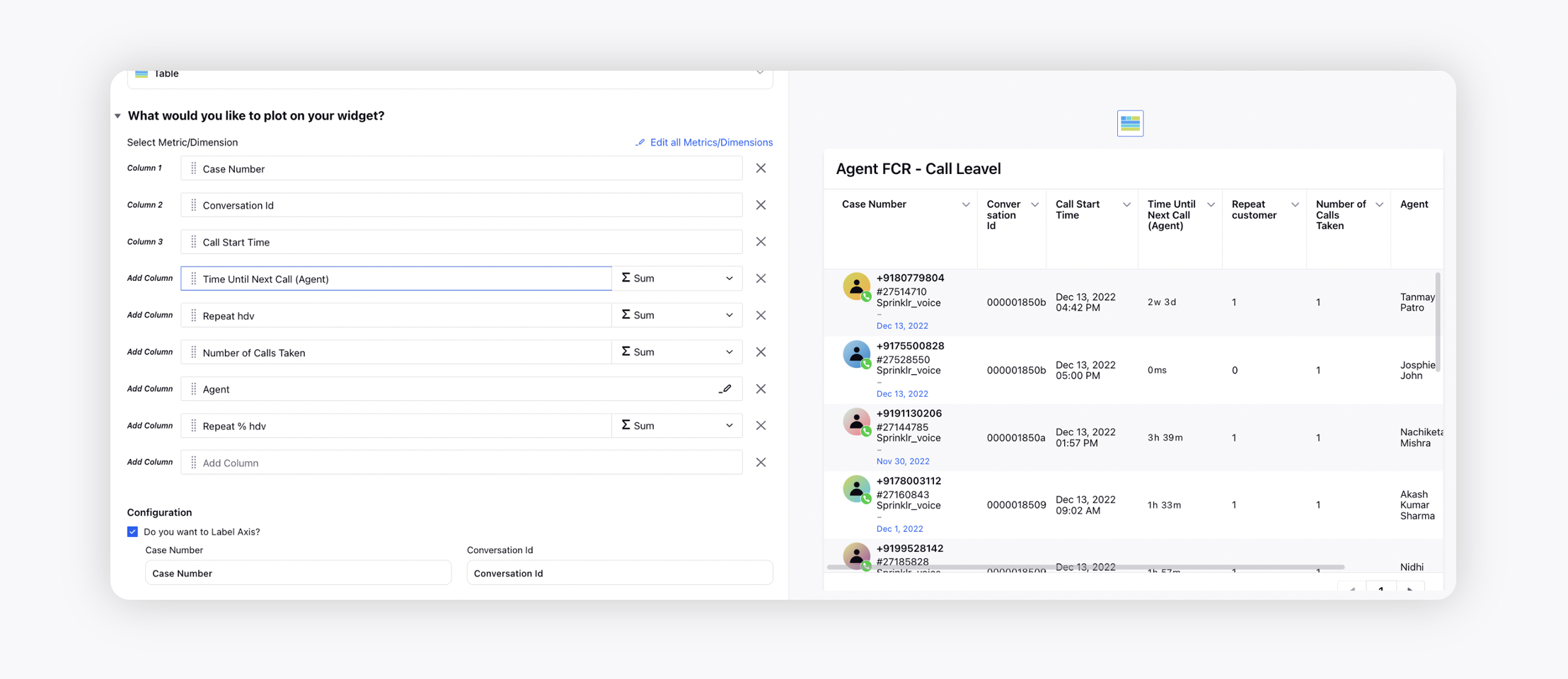
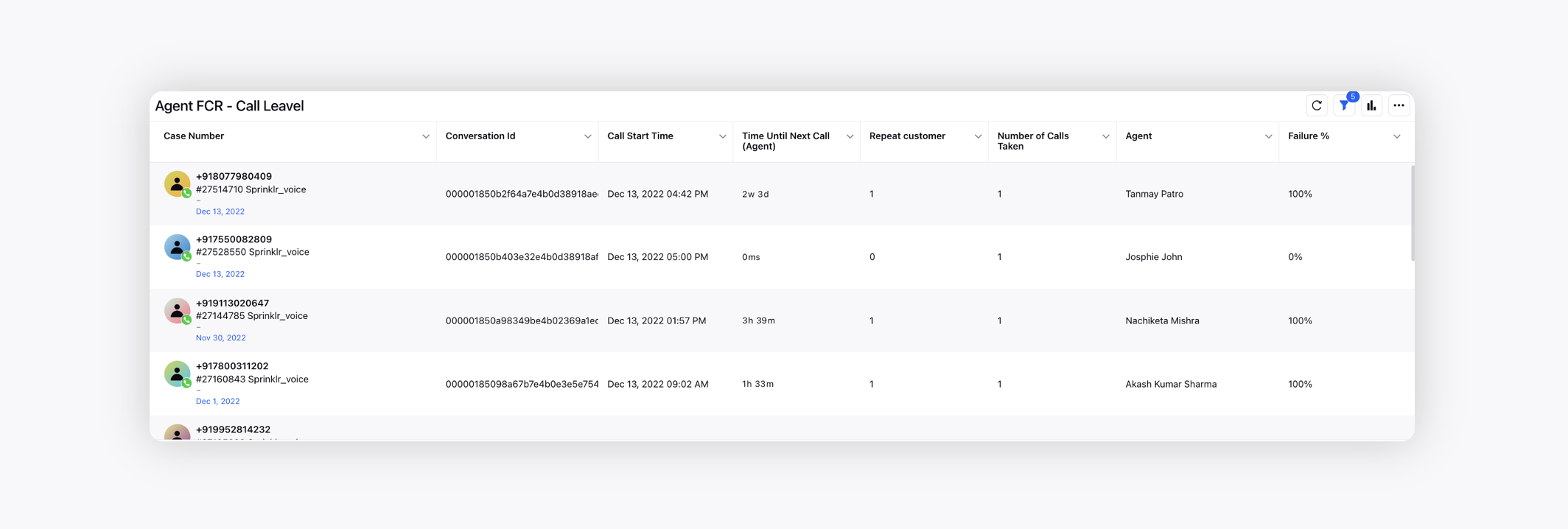
Agent FCR
Updated
FCR stands for First Contact Resolution. It measures the percentage (or number) of customer cases that have been resolved/closed in the first contact with the brand in a given time range. This metric can be measured for both Voice and digital Channels. FCR is a crucial measure of call center efficiency and customer satisfaction.
FCR in Digital Care Service
In the digital context, FCR in digital channels, such as live chat, email, or self-service portals, refers to successfully resolving customer queries or issues within the first interaction through these digital channels. It emphasizes the importance of providing accurate and timely responses, addressing customer concerns, and ensuring customer satisfaction through these digital support channels.
FCR for digital channels are calculated using Custom Field tagging or Macro Application.
In Sprinklr, FCR can be measured in the following ways:
Through Case Level Tagging (most commonly for Digital Channels)
Here, the most important piece to define is – ‘contact’ - what is a contact according to Brand/Partner?
Is Contact at a Case Level: Measure the number of Cases resolved in 1st Assignment of a Case.
Is Contact at a Response Level: Measure the number of Responses taken for resolution.
*This is more ideal/suited for formats like Email/SMS - where query can be expected to be resolved in one go.
Prerequisites
Case maker configuration to ensure if same customer returns, the same case is updated.
Configuration Required
There is some Configuration required, to help keep counts of Case status & assignment counts:
Tagging of ‘Reopen Count’ at a Case Level via Configuration: This config is done via Dialogue Tree Rules and can be set-up by IC Team during implementation.
This calculates the number of times a Case has been marked as ‘Closed’ (or any other status that the workflow deems as resolved) & then re-opened on the Sprinklr system again.
Tagging of ‘Number of Assignments’ at a Case Level via Configuration: This is a numeric value to measure a number of times a Case was assigned to any User on the system. This is to ensure the case is assigned at least once & can be used in filtering.
Once tagging is done, a Custom Metric or standalone Widget with the following logic can be made:
If FCR is being measured at 1st Assignment of a Case Level: Unique Case Count, where Re-Open Count = 0 & Status (Case) = Closed (or any other that are configured to represent closure) & Number of Assignments = 1.
This is essentially measuring all cases which have not been reopened & have been assigned at least once to a User.
If FCR is being measured at 1st Response Level: Unique Case Conut, where Re-Open Count = 0 & Status (Case) = Closed (or any other that are configured to represent closure) & Number of Assignments = 1 & User Assignment SLA Index = 1. This is essentially measuring all cases which have been assigned once – and only contain 1 User/Brand response.
Basis this Custom Metric/Widget - we can provide the count of cases which fall under the category of FCR – this can be divided by Total Cases to give a % or rate.
 Note: The limitation of the above method is that it requires proper configuration and also depends on system measurement to attest for resolution – as we cannot measure quality/effectiveness of resolution/response.
FCR via Survey (For Voice & Digital)
Another method would be to measure FCR via Survey.
This involves sending a Survey at the end of the assignment/when Agent is marking the case Closed (or after call disconnection) – for customers to fill out & attest to quality of resolution & if their query has been responded to in first go.
These details are then stored in the Survey Report, we can then use the Survey Report - and the Metric ‘Survey Response Count’ to filtering for the specific questions, to determine a count of cases deemed resolved.
Note: This depends on Customers filling out the Survey & thus cannot always be reliable for accurate counts.
Through Time Since Last Call measurement (Voice)
For Voice channels, we can track the duration between two calls from the same Customer Phone Number & use that as a basis to understand the number of Phone Numbers who have – called & number who have been satisfied/resolved in first go.
Users can create Custom Metric/Custom Widget using: ‘Unique Customer Phone Number’ & Call Count – while filtering with ‘Time Taken Since Last Call’ (Users must define time range or duration for which FCR is to be considered).
i) Custom Field tagging:
Upon closing a case, if the Agent receives a Fan message, a flag is subsequently set to indicate the reopening of a case. All the cases with this flag are classified as a Non FCR case.
ii) Macro Application:
If the Agent receives a Fan message, upon closing a case, he/she applies a 'Reopen' macro. All the cases in which 'Reopen' macro applies is classified as a Non FCR case.
FCR in Voice Care Service:
In the context of Voice, FCR relates to resolving customer inquiries or issues during the first phone call or voice interaction with a customer service representative. This involves providing the necessary information, troubleshooting assistance, or resolving the customer's concerns promptly and effectively, thereby reducing the need for the customer to make subsequent calls or engage in further interactions. FCR for Voice channel is calculated and is explained below.
Scenario 1
Call Level FCR
Case - A
Number of Calls - 3
Conversation ID | nth Call for Case | Agent | Agent FCR |
x | 1st | A | 0% |
y | 2nd | B | 0% |
z | 3rd | C | 100% |
In this example, for agents A and B, who had attended the 1st & 2nd calls of the case, FCR is 0% since there has been a repeat call for both of them, and for C, who attended the last call of the case, FCR is 100%.
So, when another call takes place, FCR will be 0% for the agent who participated in the previous call.
Scenario 2
Overall Agent FCR
If an agent has attended 10 calls, of which 6 are on 100% FCR, then the agent’s overall FCR will be 60%.
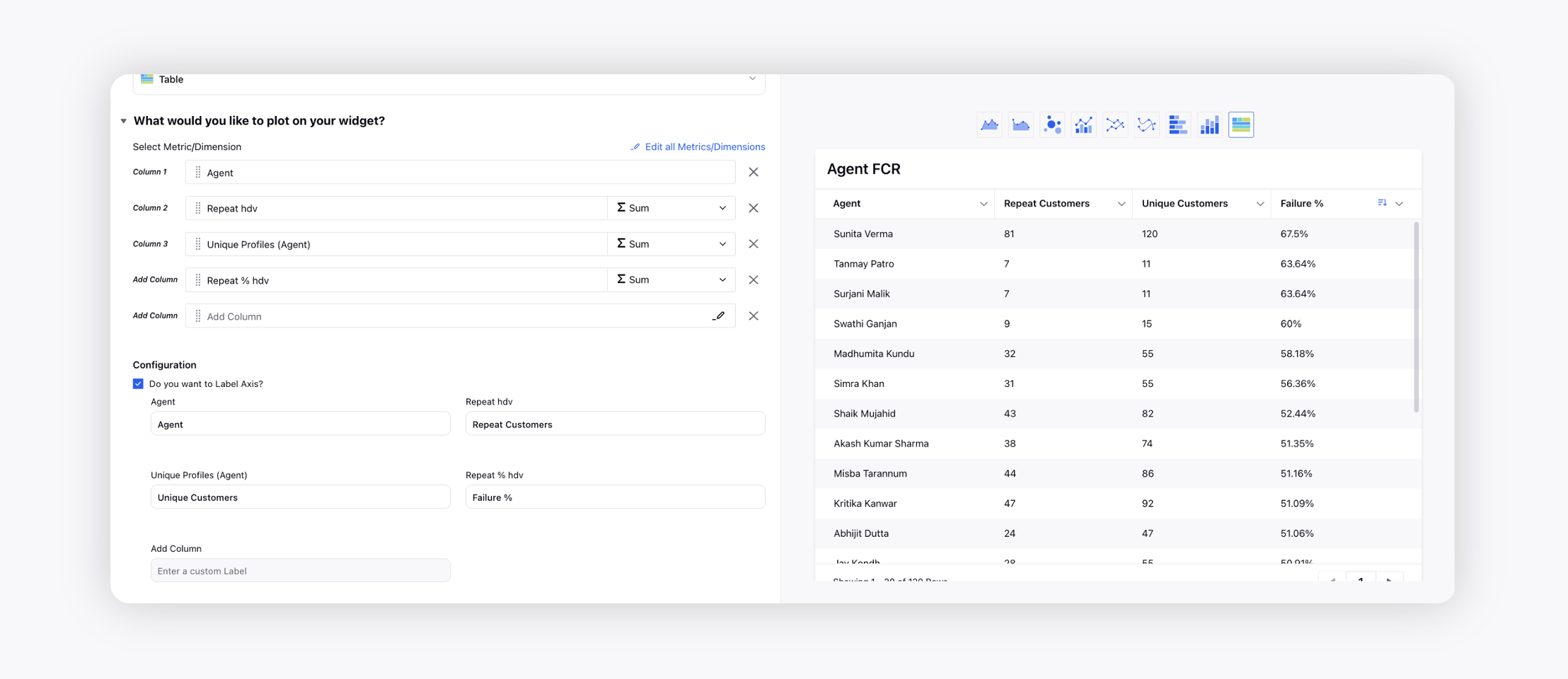
For example, in the image below, the first agent Sunita Verma received 120 unique customers, of which 81 are repeat customers. This means that 67.5% (failure%) of customers had to call back the organization for the same inquiry or issue.
Spot the Time Until Next Call (Agent) metric to view the time duration until the repeat call. To learn more about getting this capability enabled, please work with your Success Manager.
Internal note:
Use these DPs:
CAPTURE_NEXT_CALL_TIME_ON_CASE
CAPTURE_NEXT_CALL_TIME