Website Distribution: Intercept conditions
Updated
Trigger conditions enable teams to determine when website survey creatives are displayed to visitors. These conditions can be set up using browsing data, session behavior, survey history, intercept activities, external API eligibility, and customized profile fields. This approach assists businesses in directing surveys to the appropriate audience at the optimal time, including scenarios where a visitor seems poised to exit the page.
Business Use Cases
Aim surveys at particular visitors according to their location, device, browser, URL, referrer, or session behavior.
Gather feedback during key moments of high intent, including checkout, browsing the pricing page, engaging with articles, or when users show intent to exit.
Avoid excessive surveying by utilizing survey and intercept history conditions.
Utilize custom fields in profiles and responses from external APIs to display surveys exclusively to qualified visitors.
This functionality helps improve response relevance by displaying surveys only when predefined conditions are met, ensuring that customers receive invitations that are timely and contextually appropriate. By controlling frequency and repeat exposure, you can reduce survey fatigue and prevent over-surveying. It also enables more targeted feedback collection by reaching specific customer segments based on their attributes and website behavior. Additionally, linking survey triggers to visitor context helps you capture more meaningful responses and generate actionable insights to better understand customer experiences and drive informed decisions.
Prerequisites
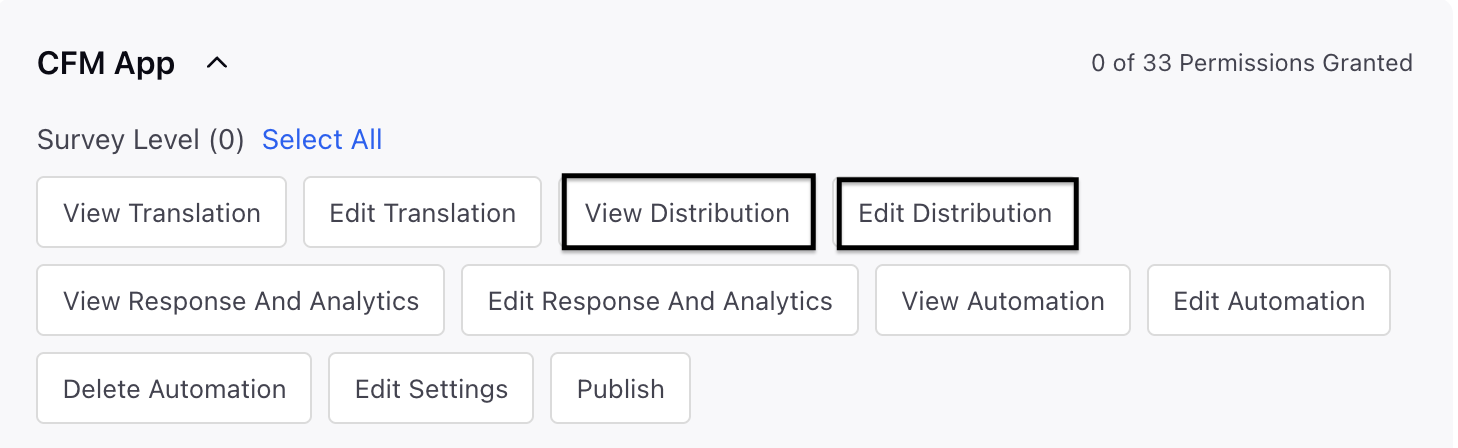
In order to access the Email Distribution, you must have the following View and Edit Distribution permissions at the Survey Level.
Setting Up Intercept Conditions
Go to Distribution page and then go to Create or edit a Website distribution.
In the intercept configuration, choose the creative that needs to be shown.
Specify the display event and the trigger conditions that need to be met prior to the creative being shown.
Save the distribution and deploy the LiveChat embed code on the website.
Supported Trigger Conditions
Category | Condition | Description | Example use case |
User browsing info | Region | Target visitors based on the region from which they are browsing. | Show a campaign feedback prompt only to visitors from EMEA or APAC regions. |
User browsing info | Country | Target visitors based on their country. | Display a localisation feedback survey only to visitors from India after launching an India-specific experience. |
User browsing info | City | Target visitors based on their city. | Collect feedback from visitors in Bengaluru after launching a city-specific offer or service flow. |
User browsing info | Browser | Target visitors based on browser and browser version. | Trigger a usability survey for visitors using Safari after identifying browser-specific rendering issues. |
User browsing info | Device type | Target visitors based on whether they are browsing on mobile or desktop. | Show a mobile experience CSAT survey only to mobile web visitors. |
User browsing info | IP address | Target or exclude visitors based on IP address criteria such as inclusion, exclusion, or regex. | Exclude internal office IPs from customer-facing website surveys. |
User browsing info | User Agent | Target visitors based on user agent details such as browser, operating system, or device signals. | Show a compatibility survey to visitors using an older Android WebView user agent. |
User browsing info | Screen resolution height | Target visitors based on the pixel height of their screen. | Collect layout feedback from users with smaller screen heights where above-the-fold content may be compressed. |
User browsing info | Screen resolution width | Target visitors based on the pixel width of their screen. | Trigger a responsive design survey for visitors on narrow mobile widths. |
Browsing session | Current URL | Target visitors based on the current page URL. | Show a checkout feedback survey only when the visitor is on a URL containing /checkout. |
Browsing session | Page Referrer | Target visitors based on the previous page that referred them to the current page. | Ask visitors arriving from a pricing page whether they found the plan comparison useful. |
Browsing session | Time Spent on Page Load | Target visitors based on time spent on the current page since it loaded. The timer restarts on refresh. | Display a help prompt if a visitor spends more than 45 seconds on the billing page. |
Browsing session | Time Spent within Session | Target visitors based on total time spent on the site during the current browsing session. | Trigger an experience survey after a visitor has spent more than 3 minutes exploring the website. |
Browsing session | Page views in current session | Target visitors based on the number of pages viewed in the current session. | Ask for feedback after a visitor views at least 5 pages without starting a conversion flow. |
Browsing session | Total page views across sessions | Target visitors based on cumulative page views across multiple sessions. | Invite high-intent returning visitors to share feedback after they have viewed 15 pages over time. |
Browsing session | Unique session count | Target visitors based on the number of unique sessions recorded for them. | Show an NPS-style survey to returning visitors on their third visit. |
Browsing session | Vertical Page Scroll Depth | Target visitors based on the percentage or number of pixels scrolled vertically on a page. | Trigger a content feedback survey after a visitor scrolls through 75% of an article. |
Browsing session | Horizontal Page Scroll Depth | Target visitors based on the percentage or number of pixels scrolled horizontally on a page. | Collect feedback on wide comparison tables after visitors horizontally scroll through product columns. |
Browsing session | Trigger state | Target visitors based on the trigger evaluation state for the current browsing session. | Suppress a secondary prompt until the primary trigger state has been met. |
Browsing session | Exit Intent | Trigger the creative when the visitor's cursor movement indicates that they may leave the page, such as moving toward browser close, back, or address controls. | Show an abandonment survey when a visitor appears likely to leave the pricing or checkout page without converting. |
Survey | Survey Seen | Target visitors based on whether a survey was previously shown. | Avoid showing another survey to visitors who have already seen one in the same campaign window. |
Survey | Survey Completed | Target visitors based on whether a survey was previously completed. | Prevent repeat prompts for visitors who completed the post-purchase survey in the last 30 days. |
Intercept | Self-Distribution Triggered | Target visitors based on whether the same distribution was triggered earlier. | Limit a distribution so it is not triggered repeatedly for the same visitor. |
Intercept | Self-Distribution Engaged | Target visitors based on whether the visitor engaged with the same distribution earlier. | Show a follow-up prompt only to visitors who previously clicked or opened the same creative. |
Intercept | Self-Distribution Closed | Target visitors based on whether the same distribution was closed earlier. | Delay re-showing a feedback prompt after the visitor dismissed it. |
Intercept | Self-Distribution Completed | Target visitors based on whether the same distribution was completed earlier. | Stop showing a distribution once the visitor has completed the associated survey. |
External API | External API condition | Target visitors using values or eligibility returned by an external API integration. | Call an eligibility service and show a feedback prompt only to loyalty members who qualify for a new offer. |
Profile custom field | Profile custom field condition | Target visitors using profile custom fields passed through the SDK or authentication. | Show an enterprise onboarding survey only when customerTierequals Enterprise. |
Testing the feature
- Create a new website distribution or update an existing one, and associate it with a creative.
- Configure one or more supported trigger conditions for the distribution.
- Deploy the LiveChat embed code on your test website.
- Access the website using visitor, session, or profile attributes that match the configured conditions.
- Verify that the creative is displayed only when all defined trigger conditions are met.
- To test the Exit Intent trigger, move the cursor toward the browser's close, back, or address bar controls and confirm that the creative is displayed as expected.
Key points to note
Trigger behaviour depends on the visitor context and the accuracy of browser, device, geography, session, and SDK-provided data.
Exit intent mainly relates to the behavior of the cursor on desktop computers and may not function in the same manner on mobile devices.
Profile custom field conditions require the relevant fields to be passed through the SDK or authentication flow.
External API conditions depend on the availability and response quality of the configured API integration.
Best Practices
Use precise URL, device, browser, and geography rules to avoid broad targeting.
Combine survey and intercept history conditions to reduce repeat prompts.
Test profile custom field and external API conditions with both eligible and ineligible users.
Validate exit intent behaviour on supported desktop browsers before enabling it for production traffic.