Unified Routing Roles and Permissions
Updated
This article provides insights into the various permissions associated with Unified Routing and its different modules.
Unified Routing
If you need more detailed control over permissions and want to assign different permissions for specific modules within unified routing (like skills, queues, capacity, etc.), you should use the Unified Routing feature. This allows for more granular governance, enabling you to manage permissions for each module individually.
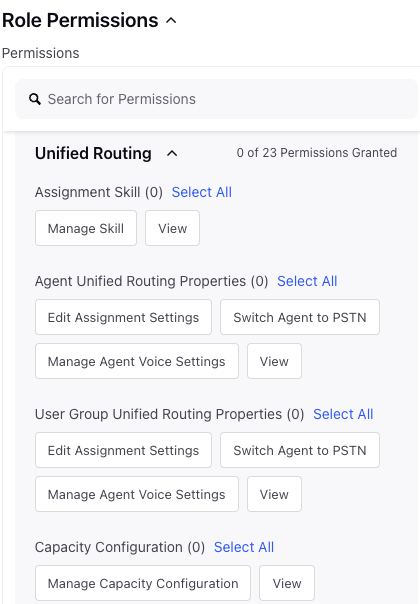
Permission Name | Description | |
Assignment Skill | Manage Skill | Allows users to add, edit and delete the skills and skill categories. |
View | Allows users to view the skills already created. | |
Agent Unified Routing Properties | Edit Assignment Settings | Allows users to change agent level configurations. |
Switch Agent to PSTN | Allows users to switch agent between VOIP and PSTN connection. | |
Manage Agent Voice Settings | Allows users to edit agent's voice related configuration. | |
View | Allows users to view the different agents/users already created. | |
User Group Unified Routing Properties | Edit Assignment Settings | Allows users to edit user group level configurations. |
Switch Agent to PSTN | Allows users to switch agent between VOIP and PSTN connection. | |
Manage Agent Voice Settings | Allows users to edit agent's voice related configuration. | |
View | Allows users to view the different user groups already created in the environment. | |
Capacity Configuration | Manage Capacity Configurations | Allows users to add any new capacity profiles or edit existing capacity configurations. |
View | Allows users to view the capacity configuration already present in the environment. | |
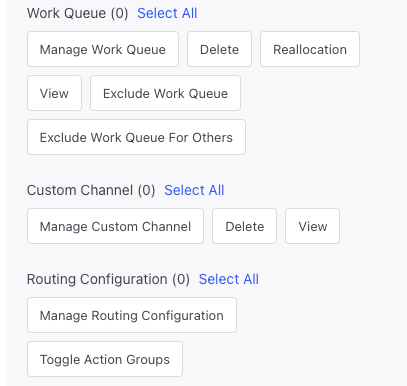
Work Queue | Manage Work Queue | Allows users to add, edit and clone a queue. |
Delete | Allows users to delete a queue. | |
Reallocation | Allows users to add and save reallocation configs in the queue which helps in transferring some traffic to other queue. | |
View | Allows users to view the queue page. | |
Routing Configuration | Manage Routing Configuration | Allows users to add,edit and clone a routing configuration. |
Toggle Action Groups | Allows users to enable or disable an Action Group. | |
| ||
Custom Channel | Manage Custom Channel | Allows users to add, edit and clone the custom channels. |
Delete | Allows users to delete any existing custom channel. | |
View | Allows users to view the custom channels already present in the environment. | |
