About Product Seat
Updated
When you create or update a user in Sprinklr, you must select a Product Seat. The Product Seat determines which Sprinklr product areas the user can access and which workflows and interfaces are available to them.
This article is intended for Sprinklr Admins who provision users and need guidance on selecting the most appropriate Product Seat based on a user’s role and day‑to‑day responsibilities.
Selecting the correct Product Seat ensures that users see the right navigation options, can perform the tasks required for their role, and do not encounter missing features or irrelevant workflows.
 Note: Product Seat options shown in your environment depend on the Sprinklr products that are enabled for your organization.
Before you choose a Product Seat
Before assigning a Product Seat, consider what tasks the user will perform in Sprinklr, whether they will publish content, manage campaigns, respond to customer messages, or work in a distributed publishing model, and whether they need access to specialized workflows such as agent‑based service tools or distributed user experiences.
The Product Seat you select affects which Sprinklr product area the user can access and see in the platform, even though detailed permissions are managed separately.
Points to Remember
Product Seat options vary by environment and reflect the products enabled for your organization. Assign a Product Seat that aligns with the primary responsibilities of the user.
Users who work across multiple Sprinklr product areas may require a Product Seat that supports broader access. Changing a user’s Product Seat later may change the product areas and workflows they can access.
Note: Access to specific capabilities may depend on your Sprinklr subscription. For details about what’s included in your subscription, contact your Sprinklr representative.
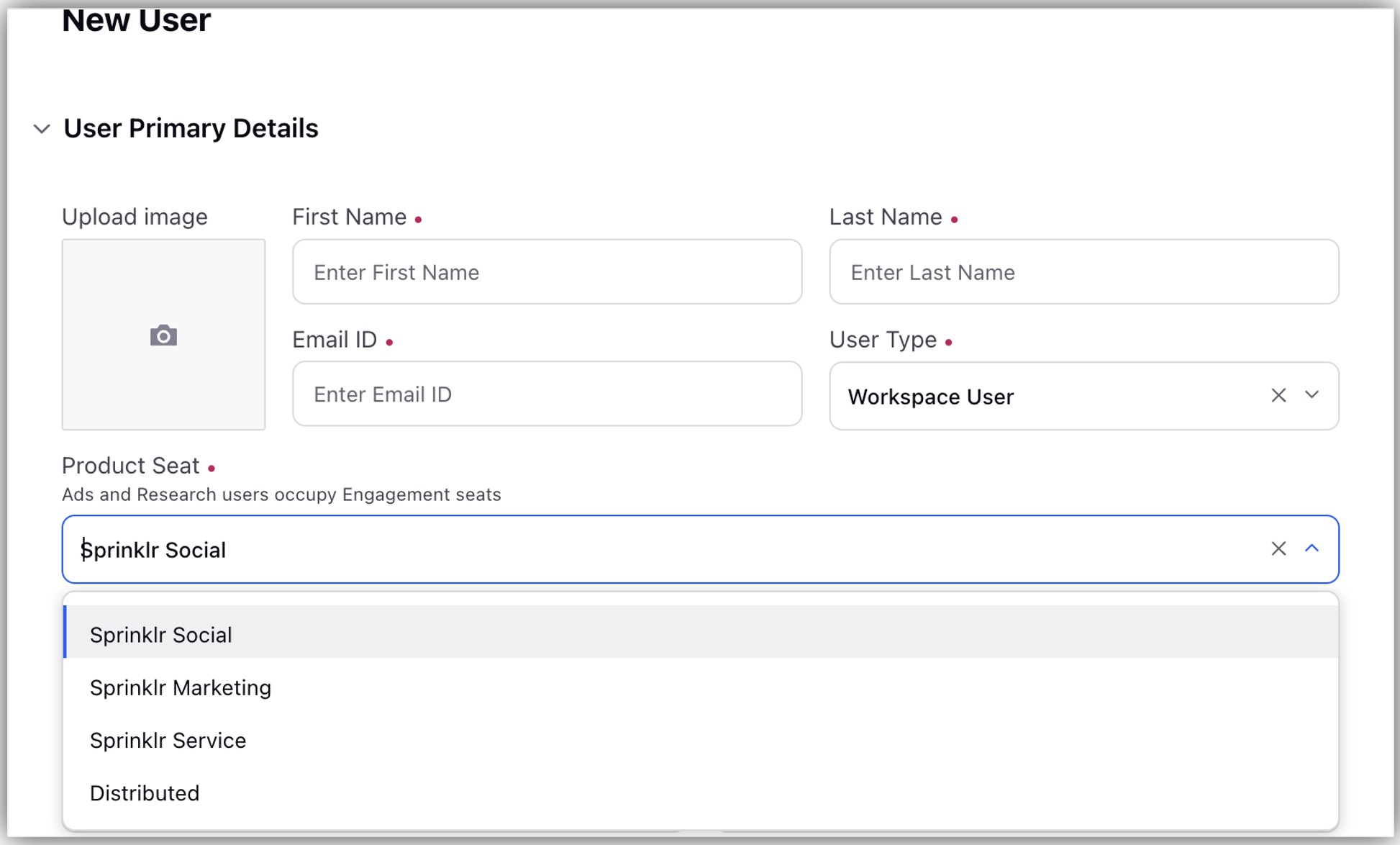
The following sections explain each Product Seat at a high level and help you understand when to choose it and what access it provides, so you can make an informed decision during user provisioning.
Sprinklr Social
Choose the Sprinklr Social Product Seat for users whose primary responsibility is managing and engaging with brand presence on social channels.
Choose this Product Seat if the user:
Publishes content to social channels
Engages with inbound social messages and comments
Monitors and manages social interactions as part of day‑to‑day brand or community management activities
Works primarily in social‑focused workflows rather than service agent or campaign‑centric workflows
This section does not list all features available with Sprinklr Social. Detailed feature documentation for Sprinklr Social is available here.

Sprinklr Marketing
Choose the Sprinklr Marketing Product Seat for users whose primary responsibility is planning, coordinating, and managing outbound marketing initiatives across channels.
Choose this Product Seat if the user:
Plans or manages marketing campaigns and initiatives
Coordinates content creation and approvals as part of marketing workflows
Works with structured marketing processes rather than day‑to‑day service agent interactions
Needs access to marketing‑focused workflows to support campaign execution and collaboration
This section does not list all features available with Sprinklr Marketing. Detailed feature documentation for Sprinklr Marketing is available here.

Sprinklr Service
Choose the Sprinklr Service Product Seat for users whose primary responsibility is handling inbound customer interactions and working in agent‑based service workflows.
Choose this Product Seat if the user:
Responds to customer messages as part of a service or support function
Works in agent‑based workflows that involve managing, resolving, or following up on customer interactions
Needs access to service‑specific interfaces designed for day‑to‑day customer support activities
Is measured on service responsiveness or resolution‑focused outcomes rather than outbound publishing or campaign execution
This section does not list all features available with Sprinklr Service. Detailed feature documentation for Sprinklr Service is available here.

Sprinklr Distributed
Choose the Sprinklr Distributed Product Seat for users who participate in a distributed publishing or engagement model and work within a simplified, role‑specific experience rather than the full Sprinklr platform.
Choose this Product Seat if the user:
Publishes or engages with content as part of a distributed team, franchise, or local unit
Works within a controlled, guided experience tailored to their role
Does not require access to full social, marketing, or service workflows
Primarily consumes assigned tasks, content, or guidance rather than configuring workflows or managing campaigns
This section does not list all features available with Sprinklr Distributed. Detailed feature documentation for Sprinklr Distributed is available here.
Product Seat Comparison
Use the following table to compare Product Seat options at a high level and identify which Product Seat best aligns with a user’s primary responsibilities.
Product Seat | Primary user type | Typical responsibilities | Key access implication |
Sprinklr Social | Social media managers and community teams | Publishing and engaging with social content | Access to social‑focused workflows and interfaces |
Sprinklr Marketing | Marketing and campaign teams | Planning and managing outbound marketing initiatives | Access to marketing‑focused workflows and collaboration tools |
Sprinklr Service | Customer support and service agents | Handling inbound customer interactions | Access to agent‑based service workflows and interfaces |
Sprinklr Distributed | Distributed or local contributors | Participating in guided publishing or engagement | Access to a controlled, role‑specific distributed experience |
Product Seat Selection FAQs