JIRA Integration
Updated
Overview
The Jira Connector connects Jira and Sprinklr to streamline collaboration and enhance workflow efficiency. This article provides an overview of the connector's capabilities, benefits, and implementation process.
The Jira—Sprinklr Connector offers several key features that facilitate seamless collaboration. First, it allows teams to automatically synchronize data between Jira and Sprinklr, ensuring that the most up-to-date information is available to all stakeholders. This synchronization eliminates the need for manual data entry and reduces the risk of errors, saving valuable time and effort.
With the connector, teams can create Jira issues directly from Sprinklr, enabling customer-facing teams to quickly report and track any customer issues or feature requests identified on digital platforms. Likewise, project teams/developers can access relevant Sprinklr data within Jira, providing them with valuable insights into customer feedback and sentiment, which can guide their development decisions.
Furthermore, the connector facilitates seamless collaboration by enabling teams to link Jira issues with Sprinklr cases. This linkage allows for comprehensive tracking and contextually relevant communication, ensuring that all relevant information is readily available to both teams. As a result, collaboration becomes more efficient, leading to faster issue resolution and improved customer satisfaction.
To learn more about getting this capability enabled in your environment, please work with your Success Manager. |
Use Case
Link Jira Ticket by Searching
When using the Jira - Sprinklr Connector, users can easily link a Jira ticket with a Sprinklr case by performing a search. Within the Sprinklr platform, the Jira connector provides a search functionality that allows users to find and select the relevant Jira ticket associated with the conversation. Once linked, the Jira ticket and the Sprinklr conversation are connected, enabling seamless tracking and collaboration. The Sprinklr Jira connector offers two options for searching Jira tickets:
Simple Text search
Advanced JQL search.
The Simple Text search option enables users to enter keywords or phrases related to the Jira ticket that they want to link. This search functionality quickly scans the Jira ticket database and presents users with a list of potential matches based on the provided search terms. Users can then select the appropriate Jira ticket from the search results to establish the link.
For more advanced search, the Advanced JQL (Jira Query Language) search option is also available. This option allows users to build complex search queries using JQL syntax, incorporating various criteria such as issue type, project, assignee, status, and more. By leveraging the power of JQL, users can narrow down the search results and locate the exact Jira ticket they need to link with the Sprinklr conversation.

Create New Jira Ticket
With the Jira - Sprinklr Connector, teams using the Sprinklr platform can directly create new Jira tickets without leaving Sprinklr. When identifying customer issues or feature requests on digital channels, the connector provides an option to generate a new Jira ticket with relevant information automatically populated. This feature saves time and reduces the risk of manual data entry errors, ensuring that important customer feedback is captured and addressed promptly by the development/project teams.

Unlink Jira Ticket
The Jira - Sprinklr Connector also allows users to unlink a Jira ticket from a Sprinklr case when necessary. This feature is particularly useful in situations where the connection between the Jira ticket and the conversation is no longer relevant or required. By simply selecting the Unlink Jira option within the connector, users can unlink the ticket and conversation, ensuring that the information remains accurate and up-to-date.

View Linked Jira Ticket Details
One of the key advantages of the Jira - Sprinklr Connector is the ability to view linked Jira ticket details directly within the Sprinklr platform, all in the same pane. This feature provides users with immediate access to important information related to the linked Jira ticket, such as its status, priority, assignee, and comments. By having these details readily available, user can make informed decisions and take appropriate actions without the need to switch between multiple platforms or windows.

Sprinklr Notes Sync with Jira Comments
The Sprinklr Notes sync with Jira comments feature enables the seamless synchronization of information between Sprinklr case notes and Jira comments. This synchronization applies to all the linked Jira tickets associated with a Sprinklr case for forward sync, as well as all the linked Sprinklr cases with Jira for reverse sync.
Sprinklr to JIRA: For example, if a customer service representative adds a new note to a Sprinklr case, providing additional information about the customer's issue or request, the note will be synchronized with the corresponding Jira ticket's comments. This synchronization keeps the development team and other stakeholders informed about the latest updates and ensures that all relevant information is available within the Jira ticket, streamlining collaboration and improving visibility across teams.
JIRA to Sprinklr: Conversely, when a Jira comment is added or updated on a linked Jira ticket, Jira Connector performs a reverse sync, synchronizing the comment with the associated Sprinklr case's notes. This reverse sync ensures that all the comments and discussions happening within the development team's Jira environment are seamlessly reflected in the Sprinklr case's notes, providing a comprehensive view of the customer's journey. For example, if a developer adds a comment to a Jira ticket, providing a status update or requesting additional information from the customer service team, that comment will be synchronized with the associated Sprinklr case's notes. This synchronization ensures that the customer service team has access to the latest updates and can provide relevant information to customers when needed, enhancing their ability to address customer concerns effectively.
These use cases demonstrate the versatility and convenience offered by the Jira - Sprinklr Connector. The connector enhances collaboration and workflow efficiency between development and social media management teams by enabling users to link, create, unlink, and view Jira tickets seamlessly within the Sprinklr platform.
In conclusion, the Jira - Sprinklr Connector serves as a bridge between project management and cu, enabling seamless enabling seamless collaboration and enhancing workflow efficiency. By synchronizing data, creating issues, and linking conversations, this integration empowers organizations to leverage the strengths of both platforms and deliver better customer experiences.
Restrict Multiple JIRA linking to a Sprinklr Case:
If the customer want to restrict the agent from linking multiple JIRA to a sprinklr case, they can enable the toggle in the connector configuration page. This features helps to have 1-to-1 mapping in reporting and tracking ticket linking and creation
LinkedBy / CreatedBy:
Customer can also make the LinkedBy and CreatedBy field mapping so that they can track the tickets Created and Linked by the agents. This helps to understand the Agent performace in JIRA ticket creation.
Step-by-Step Guide: Installing Jira App from Sprinklr Marketplace
Access the Sprinklr Marketplace
Visit the Sprinklr Marketplace platform.
Locate and select the Jira app for installation.

Jira User Authentication
When you click on Install, you will have to add the app name and sub domain and click on next. You’ll be asked to Add User. When you click on Add User, you will be redirected to Authentication Page.
Sub-domain: This is the prefix of your JIRA instance.For example, if sprinklr.attlassian.com is your instance URL, then "sprinklr" will be the sub-domain which we need to enter inthe application details here


Jira On Premise Authentication
Post 19.11.1 release, Sprinklr supports integration with on-premise (within the organization's local infrastructure) Jira instances, expanding its compatibility beyond cloud-based deployments.
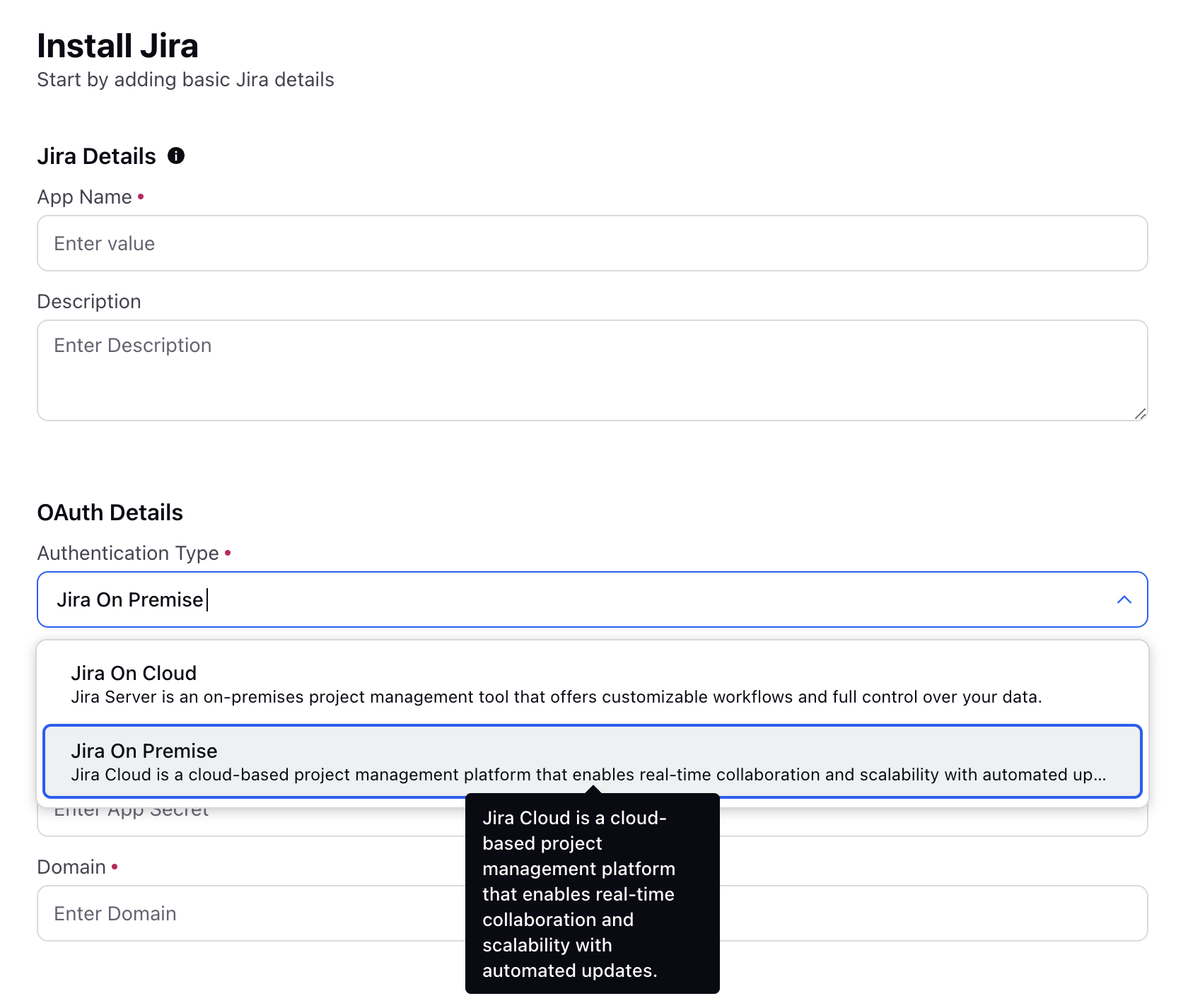
Enter the following details in the respective fields to authenticate your Jira Connector.
App Key: The App Key is a unique identifier for the application (Sprinklr) registered in the JIRA environment.
App Secret: The App Secret is a private key shared between JIRA and Sprinklr to authenticate the application securely.
Domain: The Domain specifies the URL of your JIRA instance.
Jira User Configuration
Determine the Jira user account that will be used for read/write requests from Sprinklr to your Jira instance. Preferred to have a dedicated integration/service Jirauser for this setup.

Connector Configuration
Navigate to the Connector Configuration page within the Jira app.
Provide the requested details to complete the Jira app installation, ensuring accuracy and completeness.
Specify the email address where notification emails will be received in case of connector errors.

JQL Field Search:
Decide whether to enable or disable the JQL Field Search option within the Jira app.
If enabled, the agent must use JQL (Jira Query Language) to search and link Jira tickets.
If disabled, a simple text search can be used to find and link existing Jira tickets with Sprinklr cases.
Default JQL Query:
Set the Default JQL Query field as a filter query to limit the agent's search to a specific pool of Jira tickets.
By providing a default JQL query, the agent's search results will be restricted to relevant options for linking Jira tickets.
Ticket Configuration
Access the Ticket Configuration page within the Jira app.
Configure the Jira Ticket field mapping for synchronization between Sprinklr cases and Jira tickets.
Ensure proper mapping of fields to enable forward sync (Sprinklr to Jira) and backward sync (Jira to Sprinklr).

Ticket Layout
Go to the Ticket Layout page within the Jira app.
Create a layout by selecting the project and issue types.
The layout facilitates an editable page for creating Jira tickets and defines the viewable page for linked Jira tickets in Sprinklr.

Editable Fields:
Utilize the drag and drop functionality to retrieve fields from the left side pane within the Ticket Layout page.
Drag and drop relevant fields from your linked Jira instance to make them visible during Jira ticket creation from Sprinklr.
Set default inputs for each field to prepopulate specific values when creating Jira tickets.
Viewable Fields:
Within the Ticket Layout page, use drag and drop to select fields from your linked Jira instance.
These fields will be visible to agents when viewing the ticket details of a linked Jira ticket in Sprinklr.

JIRA Widget in Care Console
In the recent Release, we have added JIRA widget in Care console, where agents can easily create or link exisiting JIRA tickets to Sprinklr Cases and sync the properties.
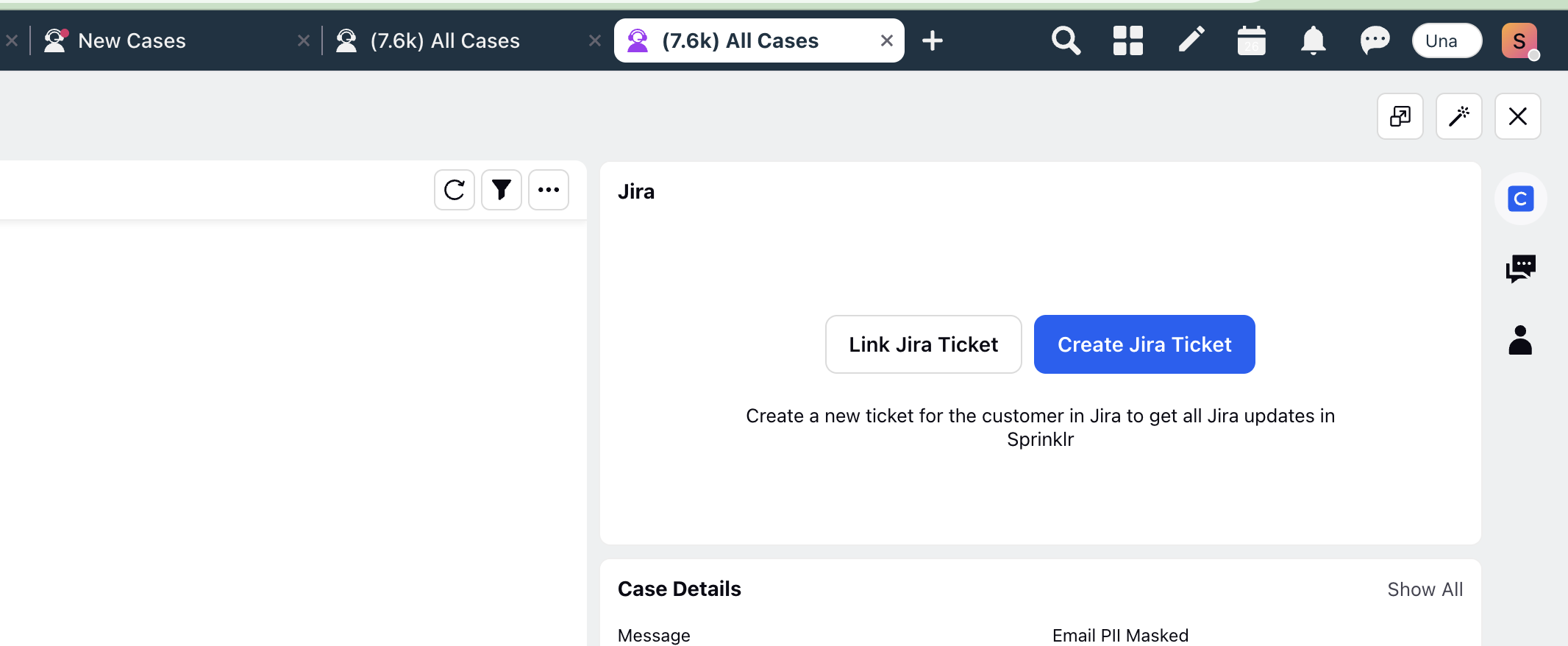
Comments Sync
Now the comments from the JIRA can be synced with the Sprinklr Collaboration notes on Case with multiple media types like PDF, Word, Excel files.