Reporting on Agent Acknowledgement
Updated
Tracking Disputed Comments
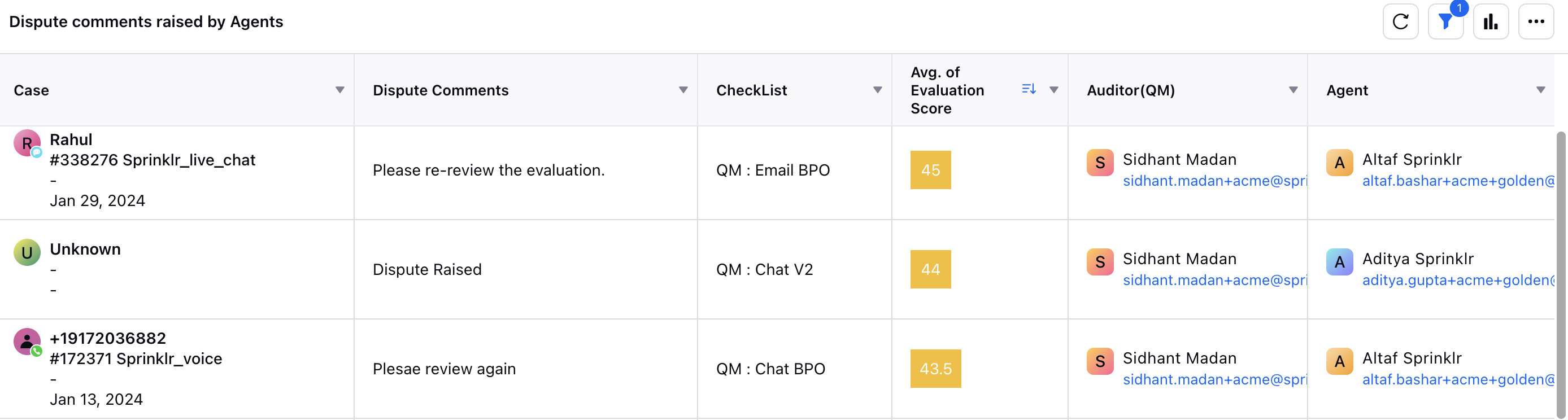
The Dispute Comment dimension can be plotted alongside other audit-related data, such as the auditor’s name, checklist, and agent details. This widget consolidates key information, including:
Case ID
Dispute comments provided by the agent
Associated checklist
Average evaluation score
Auditor and agent names
The report highlights dispute comments as its dimension, using the format:
Dispute Comments
Example:
A report may show cases like Rahul (#338276 Sprinklr_live_chat) with comments such as “Please re-review the evaluation”, along with:
Checklist name (For example, QM: Email BPO)
Average evaluation score (For example, 45)
Auditor and agent details
By presenting these dimensions together, the widget provides a clear view of dispute-related feedback and supports better analysis of dispute patterns and resolution processes.
Category-Level Dispute Details
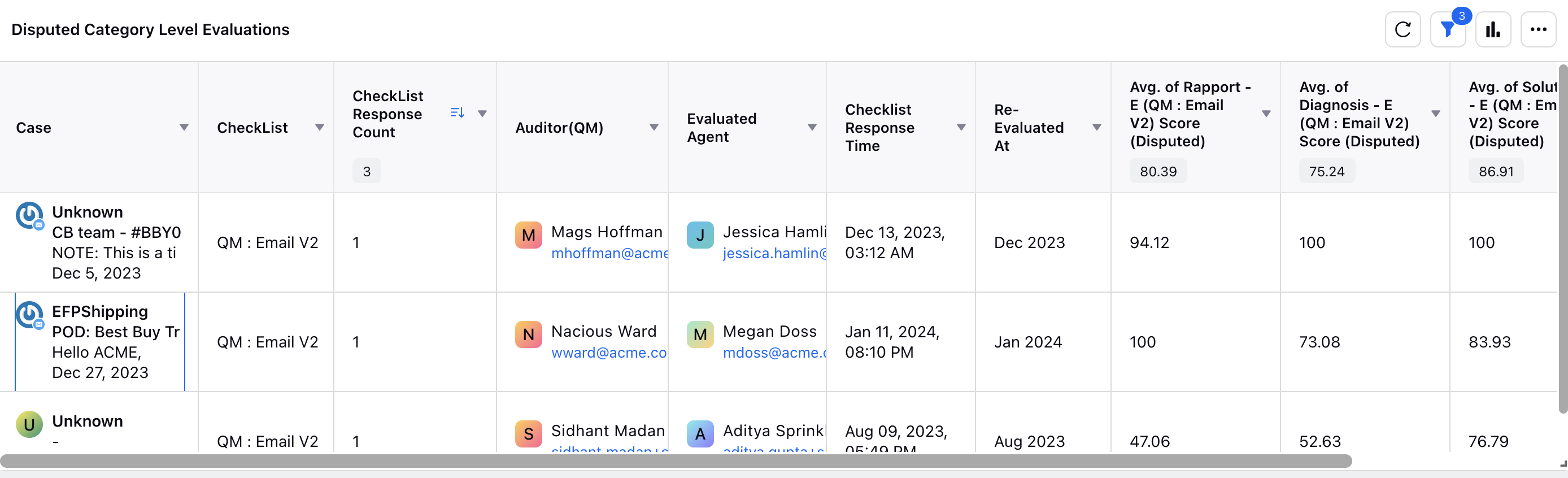
This widget offers a consolidated view of category-level scores after agent disputes, enabling deeper insights into dispute outcomes and performance trends. It displays:
Case ID and associated channel
Checklist name
Number of checklist responses
Auditor and agent names
Timestamps for initial checklist response and re-evaluation
The report highlights category-level scores before and after the dispute for specific dimensions, using the format:
<Category Name> [Checklist Name] Score (Disputed)Example dimensions:
Rapport [QM: Email V2] Score (Disputed)
Diagnosis [QM: Email V2] Score (Disputed)
Solution [QM: Email V2] Score (Disputed)
By consolidating this information, the widget supports transparent analysis of performance changes and helps identify areas for improvement in dispute resolution.
Item-Level Dispute Details
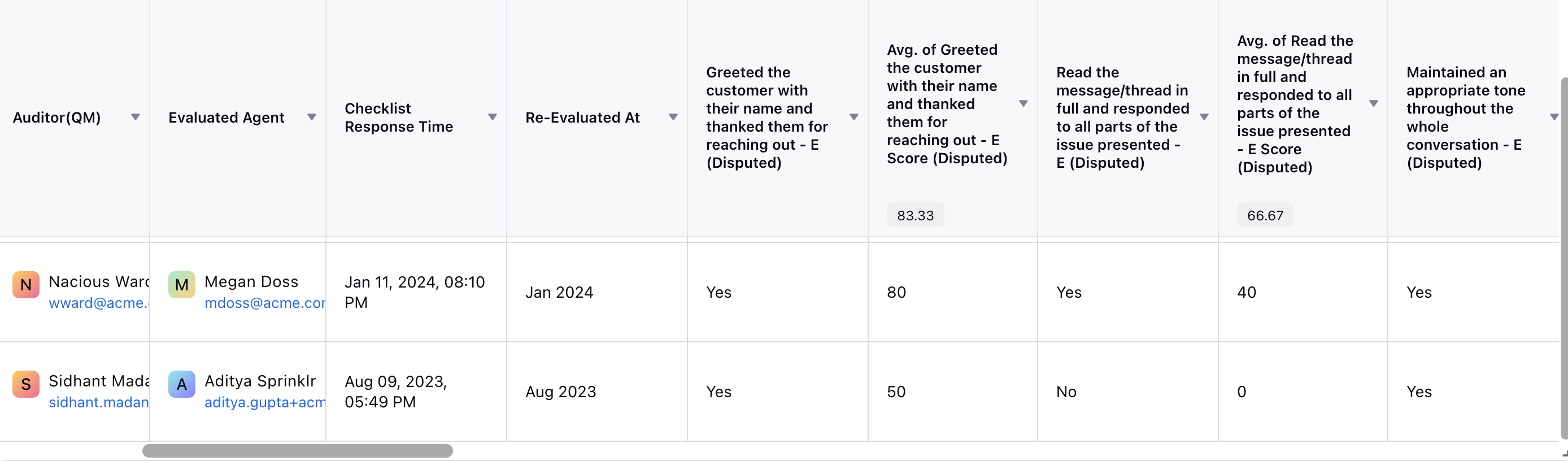
This widget provides a detailed view of item-level scores following an agent dispute, enabling granular analysis of the resolution process. It includes:
Evaluated agent’s name
Auditor associated with the dispute
Checklist name under dispute
Timestamps for:
Initial checklist response
Re-evaluation of disputed items
The report highlights Item-level scores before and after the dispute for specific dimensions, using the format:
<Item Name> Score (Disputed)
By consolidating these details, the widget offers a structured perspective on score changes, supporting accurate and informed dispute reviews.
|

Identifying Dispute Questions
This table displays audit cases with disputed checklist questions. Calculations for dispute counts and related metrics are based on the last two columns, Disputed Items and Disputed Item List, which list the specific questions flagged for review.
.png "MicrosoftTeams-image_(90).png")
Re-evaluation Call Audits
In disputed flows, it is important to track how scores change after re-evaluation. A sample report provides visibility into call audits that have been re-evaluated following disputes. It includes:
Agent name
Case ID and associated channel
Auditor name
Checklist response count
Timestamps for:
Initial evaluation submission
Dispute assignment for re-evaluation
Completion of re-evaluation
The report also displays:
Average evaluation score before and after the dispute
Percentage change in score
This consolidated view ensures transparency and provides actionable insights into quality assurance and dispute handling.

Refer to the following table for dimensions and definitions of Dispute reporting.
|
For more information, please refer to the reporting glossary article.