Advantage+ Sales, App Promotion, and Leads Campaigns
Updated
Facebook Advantage+ Sales, App Promotion, and Leads Campaigns help improve ad efficiency and personalization by using Meta’s advanced automation and AI-driven optimization.
Sprinklr supports Advantage+ functionality for the following campaign objectives:
Sales
App Promotion
Leads
Advantage+ Sales Campaigns(ASC) are designed for e-commerce, retail, direct-to-consumer, and brand advertisers looking to drive better performance with greater efficiency. These campaigns offer flexible control over key elements such as creative, targeting, placements, and budget, while unlocking more opportunities to optimize for conversions. By combining all audiences for a given market into a single campaign, Advantage+ Sales Campaigns simplify setup and management and help reduce audience overlap compared to running multiple segmented campaigns.
Advantage+ App Campaigns(AAC) provide an efficient way to drive app installs and in-app actions. Powered by Meta AI, these campaigns automatically optimize bidding, audiences, and placements to help you reach the right users and maximize conversion value. With a streamlined setup that blends automation with optional manual controls, Advantage+ App Campaigns enable faster launches, effective scaling, and improved allocation of ad spend while maintaining flexibility when adjustments are needed.
Advantage+ Leads Campaigns (ALC) help generate qualified leads using Meta's AI-driven optimization capabilities. These campaigns optimize audience targeting, placements, and budget to improve lead generation performance.
Across ASC, AAC and ALC, Meta provides automation features such as Advantage+ Audience and Use as Suggestion. These features help Meta identify additional people who may be relevant to your campaign objective. When Use as Suggestion is enabled, your audience criteria are treated as optimisation signals rather than strict targeting restrictions, allowing Meta to expand delivery beyond those criteria when it predicts better results.
This article covers:
Value Proposition
Persona | Problem | Value/Use Cases |
Ads Media Manager | It is difficult for users to optimize campaigns for better performance. | Advantage+ sales and app campaigns provide greater flexibility to control levers such as creative, targeting, placements, and budget, and provide opportunities to optimize campaigns. |
It is difficult to personalize ads and target multiple audiences at the same time. | Advantage+ sales and app campaigns let you combine all your audiences for a given market into a single campaign structure. This is designed to simplify creation and management while reducing audience overlap. Advantage+ Leads Campaigns support audience optimization capabilities such as Advantage+ Audience and audience suggestions, helping you reach people who are more likely to convert while maintaining flexibility over audience targeting. |
Governing Factors for Advantage+ State in Campaigns
Advantage+ state for Sales, App Promotion, and Leads campaigns depends on three required settings. To enable Advantage+ state, your campaign must meet all of the following criteria:
Budget:
Campaign Budget Optimization is enabled, or
The campaign contains a single ad set
Audience:
Advantage+ Audience is selected, or
Audience settings are set as suggestions in at least one ad set, or
Ad set is not using custom audience inclusion, or
Advantage Custom/Lookalike Audience is used, or
Advantage Detailed Targeting is used, or
Only geo-location targeting is configured
Placements:
Advantage+ Placements is selected, or
All available placements are selected
 Notes:
Existing ASC/AAC Campaigns: If your campaign does not use Existing Customer Budget Percentage, we will automatically migrate them to the new Advantage+ structure via the API.
Create Facebook Advantage+ Sales, App, and Leads Ads
Open a new tab and go to Sprinklr Marketing > Advertising > Ads Composer.
Select your Facebook ad account on the Ads Composer window.
Select Sales, App Promotion, or Leads in the Paid Initiative Details tab. For more details, refer to Facebook and Instagram Objectives.
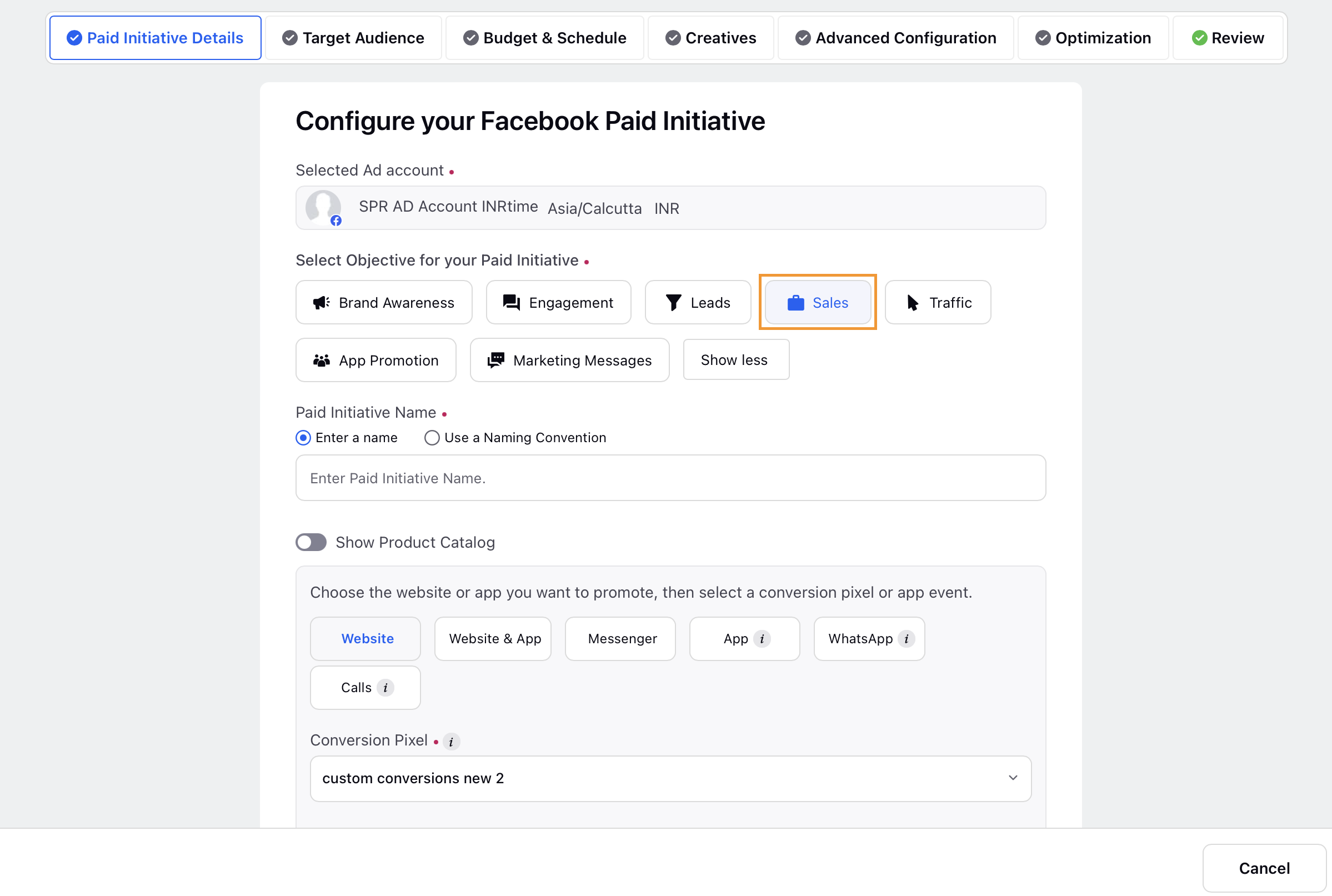
Once you select the objective, a banner on the right will display the Advantage+ state of the campaign.

Enter a name for your campaign or use a naming convention under Paid Initiative Name.
Select an object you want to promote such as a website in your ad sets (promoted object) from the section below Campaign Name.
Select the required Conversion Pixel and Event for the object you want to promote.
Go to the Target Audience tab to select or create a target audience. To enable the Advantage+ state, at least one ad set in the campaign must meet one of the following criteria:
Advantage+ Audience is enabled for at least one ad set in the campaign, or
If Advantage+ Audience is not enabled, the ad set must meet all of the following criteria:
Age: Ad Set is using the default age range, or an age range of 25 or younger, or age is set as a campaign suggestion. To set age as a suggestion, select the Use Age Range as Campaign Suggestion checkbox.

Gender: Ad Set is using the default gender setting or gender is set as a campaign suggestion. To set gender as a suggestion, select the Use Gender as Campaign Suggestion checkbox.

Custom Audience: Does not include custom audience targeting, or uses Advantage+ Custom Audience
Lookalike Audience: Uses Advantage+ Lookalike Audience.
Detailed Targeting: Uses Advantage+ Detailed Targeting.
Location Targeting: Uses geo-location targeting only.
For Leads campaigns, Use as Suggestion allows Meta to treat targeting selections as recommendations instead of restrictions and expand delivery when it predicts better performance. The option is available for Age, Gender, Custom Audience inclusion, Lookalike Audience inclusion, and Detailed Targeting. For Age and Gender, it appears only when you use non-default values.
After setting up the target audience, enter your budget and schedule details in the Budget & Schedule tab.
Scroll down to the Enter Placement details for all Ad Sets section and select Advantage+ placement. To keep the Advantage+ state enabled for the campaign, follow these guidelines:
Do not set placement targeting or placement exclusions, so all available placements remain eligible.
You may set placement exclusions at the ad account level and still keep the campaign eligible for an Advantage+ state that is not disabled.

Once the Advantage+ state for the campaign is enabled, the Advantage+ Sales, Advantage+ App, or Advantage+ Leads state on the right will be set to On.

Configure any required Advanced Configuration and Optimizations settings.
Review the campaign details and Publish your ad.
FAQs