Troubleshooting
Updated
This document provides solutions to common issues you might encounter while integrating the Sprinklr Live Chat React Native SDK.
1. Live Chat Not Showing Up for Authenticated Users
If the Live Chat widget is not appearing after passing authenticated user details, follow these steps to verify the user hash:
1. Navigate to your Live Chat Application in Sprinklr.
2. Click the Options icon next to your application and select Validate User Hash.
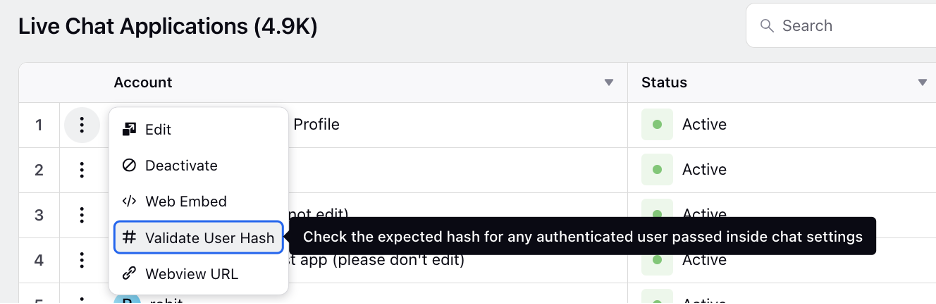
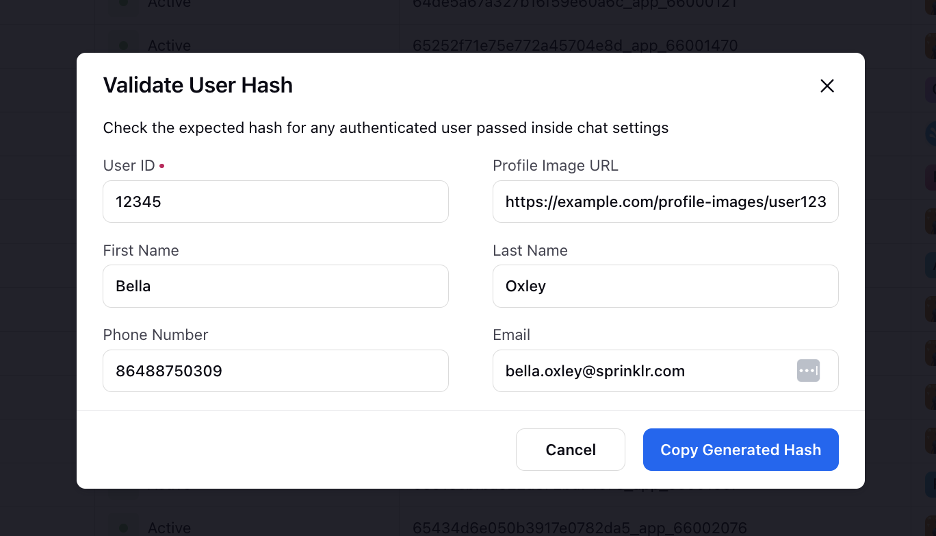
3. In the Validate User Hash window, enter the following details:
User ID
Profile Image URL
First Name
Last Name
Phone Number
Email
4. Click Copy Generated Hash and compare it with the hash generated in your implementation.
5. If the hashes don’t match, ensure your hash generation logic aligns with Sprinklr’s authentication mechanism.
2. App Crashes While Rendering MessengerView
If your app crashes due to UIViewControllerBasedStatusBarAppearance being set to false in Info.plist, follow these steps to overwrite the status bar behavior without modifying the global setting:
Solution: Wrap MessengerView inside MessengerUIManagersProvider
import { MessengerUIManagers } from '@sprinklrjs/chat-native-client';import { useMemo } from 'react';const { Provider: MessengerUIManagersProvider, UI_MANAGER_TYPES: MESSENGER_UI_MANAGER_TYPES } = MessengerUIManagers;const statusBarManager = useMemo(() => ({pushStackEntry: props => { /* Custom implementation */ },popStackEntry: props => { /* Custom implementation */ },replaceStackEntry: (propsToReplace, props) => { /* Custom implementation */ },setHidden: (hidden, animation) => { /* Custom implementation */ },setBarStyle: (barStyle, animated) => { /* Custom implementation */ },setBackgroundColor: (backgroundColor, animation) => { /* Custom implementation */ },setTranslucent: translucent => { /* Custom implementation */ },}), []);const uiManagers = useMemo(() => ({[MESSENGER_UI_MANAGER_TYPES.STATUS_BAR]: statusBarManager,}), [statusBarManager]);return (<MessengerUIManagersProvider value={uiManagers}><MessengerViewonDismiss={navigation?.pop}launchOptions={route?.params?.launchOptions}chatInitialisationContext={route?.params?.chatInitialisationContext}/></MessengerUIManagersProvider>);
This ensures the MessengerView does not crash while preserving your app’s existing status bar settings.
3. Disabling Autolinking for Peer Dependencies (Android)
If your app faces compatibility issues due to autolinking, disable autolinking for @sprinklrjs/chat-native-client on Android.
Solution: Modify react-native.config.js
1. Create a react-native.config.js file in your project’s root directory (if it doesn’t exist).
2. Add the following configuration:
module.exports = {dependencies: {'@sprinklrjs/chat-native-client': {platforms: {android: null, // Disable Android autolinking; other platforms remain unaffected},},},};
3. Run a clean installation using Yarn:
yarn install
4. Rebuild your app:
cd android && ./gradlew clean && cd ..yarn android
This prevents conflicts and ensures smooth integration with your project.
4. Declaration File Not Found
You may encounter the following TypeScript error when importing the @sprinklr/chat-native-client module:
Could not find a declaration file for module '@sprinklr/chat-native-client'. '/Users/dhaval.patel/gopuff_ws/theseus/node_modules/@sprinklr/chat-native-client/lib/index.js' implicitly has an 'any' type. Solution:
To resolve this issue, you have two options:
Install Type Definitions (if available):
npm i --save-dev @types/sprinklr__chat-native-client2. Manually Declare the Module: If type definitions are not available, create a declaration file in your project root:
Create a file named index.d.ts (or any .d.ts file) in the root directory.
Add the following declaration:
declare module '@sprinklr/chat-native-client';
5. Build Failed with an Exception
You may see a build failure during the Android build process with an error similar to:
> Task :sprinklrjs_chat-native-client:packageDebugResources FAILED[Incubating] Problems report is available at: file:///Users/user/Desktop/untitled%20folder/MSIL_ICP_FE/android/build/reports/problems/problems-report.htmlDeprecated Gradle features were used in this build, making it incompatible with Gradle 9.0.You can use '--warning-mode all' to show the individual deprecation warnings and determine if they come from your own scripts or plugins.For more on this, please refer to https://docs.gradle.org/8.11.1/userguide/command_line_interface.html#sec:command_line_warnings in the Gradle documentation.251 actionable tasks: 1 executed, 250 up-to-dateFAILURE: Build failed with an exception.* What went wrong:A problem was found with the configuration of task ':sprinklrjs_chat-native-client:packageDebugResources' (type 'MergeResources').- Gradle detected a problem with the following location: '/Users/user/Desktop/untitled folder/MSIL_ICP_FE/node_modules/@sprinklrjs/chat-native-client/android/build/generated/res/resValues/debug'.Reason: Task ':sprinklrjs_chat-native-client:packageDebugResources' uses this output of task ':@sprinklr-chat-native-client:generateDebugResValues' without declaring an explicit or implicit dependency. This can lead to incorrect results being produced, depending on what order the tasks are executed.Possible solutions:1. Declare task ':@sprinklr-chat-native-client:generateDebugResValues' as an input of ':sprinklrjs_chat-native-client:packageDebugResources'.2. Declare an explicit dependency on ':@sprinklr-chat-native-client:generateDebugResValues' from ':sprinklrjs_chat-native-client:packageDebugResources' using Task#dependsOn.3. Declare an explicit dependency on ':@sprinklr-chat-native-client:generateDebugResValues' from ':sprinklrjs_chat-native-client:packageDebugResources' using Task#mustRunAfter.For more information, please refer to https://docs.gradle.org/8.11.1/userguide/validation_problems.html#implicit_dependency in the Gradle documentation.
Solution:
To bypass this issue, explicitly disable the Android platform for the @sprinklrjs/chat-native-client module in your react-native.config.js file:
'@sprinklrjs/chat-native-client': {platforms: {android: null,},},
6. Android Build Failure When minifyEnabled is Set to True
You are encountering an Android build failure when minifyEnabled is set to true.
Solution:
Add the following rule to your proguard-rules.pro file.
-keep class com.facebook.react.devsupport.** { *; }

# if using cobrowse feature:
-keep class io.cobrowse.** { *; }
If co-browsing is enabled, then add the following line:
# if cobrowsing is enabled-keep class io.cobrowse.** { *; }
Additional Resources