





Transform CX with AI at the core of every interaction
Unify fragmented interactions across 30+ voice, social and digital channels with an AI-native customer experience platform. Deliver consistent, extraordinary brand experiences at scale.




Top Contact Center Software Requirements
Aksheeta Tyagi is an experienced content marketer specializing in customer service, customer experience, contact center technology and AI-powered customer support. She writes in-depth guides on customer feedback management, conversational AI, agentic AI and enterprise service transformation to help businesses deliver better customer experiences at scale.
Contact center software requirements are all the capabilities, integrations, technical needs and security controls a brand defines before it evaluates its CCaaS options.
The list must account for the platform itself, as well as the infrastructure and staffing that determine whether your chosen platform works once deployed. It becomes even more consequential to get it right as the spend behind it grows. The market expects 50% of customer service organizations to double their technology spend by 2028 without an equivalent reduction in talent, which means a requirements list built around headcount savings evaluates your options against an outcome the research no longer supports.
This blog covers the ten contact center software capabilities you should consider, the system and infrastructure requirements that work in tandem with them, and the staffing needs that determine how well the contact center functions.
- Understanding the significance of contact center software
- Top 10 contact center software requirements
- Technical and system requirements
- Infrastructure and equipment requirements
- Team and staffing requirements
- How to prioritize contact center software requirements
- Key factors to choose your contact center software
- Why Sprinklr Service is your best choice
Understanding the significance of contact center software
Contact center software solutions are engineered to enhance and streamline support-related communication between organizations and their customers. These versatile systems manage a spectrum of incoming and outgoing messages from customer touchpoints like phone, email, live chat, social media platforms, review forums, websites/apps and beyond. In practice, that covers round-the-clock availability, consumer insights drawn from interaction data, cloud deployment that lets agents work from anywhere, and automation through call routing and customer self-service that changes how much volume reaches a person at all. What matters for a requirements list is not the benefit but the specification behind it, which is what the rest of this checklist sets out.
Top 10 contact center software requirements
These ten capabilities form the software layer of a requirements document. Each row below states what to write into the specification and how to test the vendor’s claim during a demo rather than accept it from a feature grid.
Requirement | What to specify | How to verify it in a demo |
1. Omnichannel communication | Channels supported natively versus through integration, and whether conversation context persists when a customer switches channels mid-issue. | Start a chat, escalate it to voice mid-session, and ask to see the agent view of the prior transcript without the customer repeating anything. |
2. Customer interaction management | CRM systems supported, whether the integration is read-only or writes back, and how customer identity is resolved across channels. | Ask to see one customer profile assembled from three different channels in a single agent screen. |
3. Quality management | Percentage of interactions scored, number of quality and compliance parameters, and whether scoring is manual, automated or both. | Ask for a live score breakdown on a real interaction rather than a screenshot of a completed scorecard. |
4. Agent coaching and training | Whether coaching actions are generated from quality scores automatically, and whether performance data breaks down by individual skill. | Ask to see a coaching task created from a failed quality parameter without a supervisor manually raising it. |
5. Self-service | Containment measurement method, the escalation path to a human, and the source of truth the knowledge base draws on. | Ask what share of contained sessions produce a repeat contact within seven days. |
6. Compliance and security | Certifications held and their audit dates, data residency options, retention and redaction controls, and regional regulatory coverage. | Ask for the certification list with dates, and ask specifically where AI processing occurs geographically. |
7. AI and automation | Whether AI is native or third-party, the scope of autonomous resolution, escalation design, and audit trail and model governance. | Ask whether the AI sits in the core platform or is integrated, then ask to see the decision log for one resolved case. |
8. Reporting and analytics | Real-time versus historical coverage, role-based views, and whether AI agent activity appears in the same reports as human agent activity. | Ask to see a single report containing both AI-handled and agent-handled volume side by side. |
9. Flexibility and scalability | Deployment model, API and webhook coverage, peak-volume handling, and number portability. | Ask how the platform performed on the customer’s highest-volume day in the past year, with the figures. |
10. Cost management | License model, usage-based charges, implementation and integration cost, and how a resolution is defined if pricing is outcome-based. | Ask for a three-year total cost model rather than an annual license quote. |
1. Omnichannel communication
Omnichannel communication is more than the ability to operate on several channels at once. It is the ability to move a conversation from voice to live chat to social or SMS without the context of that conversation getting lost in the handover, which is the part that separates omnichannel from multichannel in practice.
Being omnipresent on all the customer touchpoints ensures round-the-clock availability and accessibility, which the modern customer expects from their preferred brands. However, omnichannel communication goes beyond ensuring omnichannel customer service.
Omnichannel customer service is a customer-centric approach to delivering seamless support experiences across multiple communication channels.
For example, a customer tries to find an answer on the knowledge base but cannot, so they opt for an email response or go for a live agent reachable through chat or phone.
At every touchpoint, the customer history is available to the support team and the customer need not repeat their issue, eliminating the need for redundant explanations. This makes for a pleasant, harmonious experience that boosts customer satisfaction and loyalty towards the brand. Contact center software deploys features like call routing, call deflection and omnichannel routing to provide an omnichannel customer experience.
- Call routing manages and routes incoming calls to ensure they reach the most appropriate agent or department, optimizing efficiency and enhancing customer satisfaction.
- Call deflection is a proactive strategy designed to minimize call volume by steering customers toward alternative channels or self-service options.
An omnichannel contact center surpasses multichannel alternatives by offering seamless customer support. In scenarios where phone lines are busy, agents can effortlessly redirect waiting calls to channels like WhatsApp or Live Chat. In contrast, multichannel centers may leave customers waiting or force them to repeat their issues when switching channels. Learn more: Omnichannel contact center vs. Multichannel contact center
💡 Pro tip: Find contact center software that deploys omnichannel routing as you can leverage it to integrate diverse channels, allowing customers to transition seamlessly between them while maintaining context. For example, a customer may initiate an inquiry through chat and later choose to continue the conversation via a voice call without repeating information.
2. Customer interaction management
Customer interactions feel tailor-made because of contact center software integration with CRM systems. It empowers agents with customer data, history and preferences.
When an agent picks up a call or opens a chat, they should already have previous interactions, purchase history and account status in front of them. The requirement worth specifying is not whether the platform integrates with your CRM but whether that integration writes back, because a read-only connection leaves the record of the interaction stranded in a different system.
3. Quality management
Quality management is a necessity for delivering exceptional service. Quality management deploys contact center workforce optimization and agent performance analytics to optimize a contact center’s workforce and enhance agent engagement.
Quality management in contact centers encompasses these modules:
#1. Contact center workforce optimization (WFO) is a strategic approach to efficiently manage and maximize the performance of contact center agents. It establishes a balance between workforce and workload by forecasting, scheduling and performance measurement.
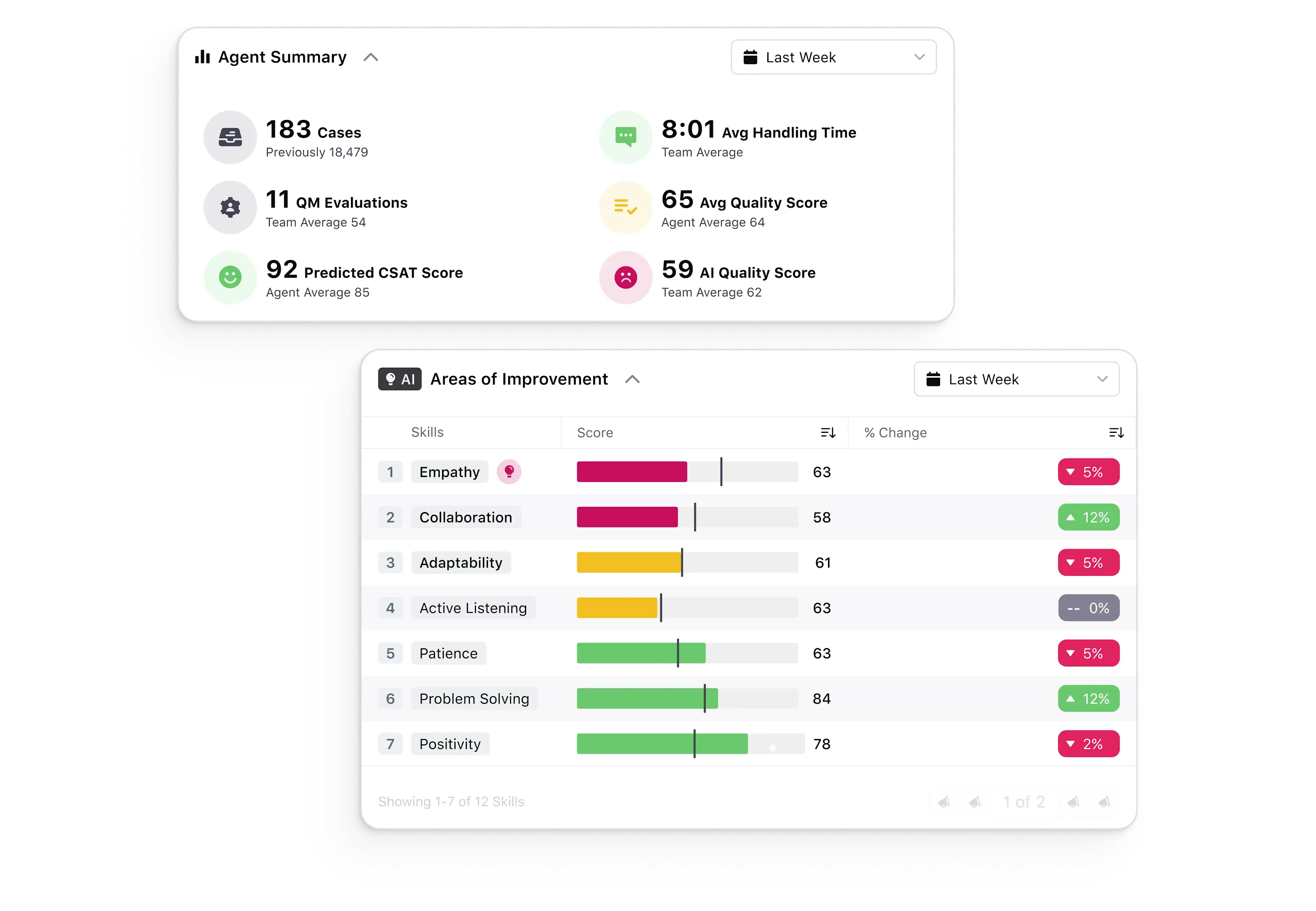
#2. Agent performance management is a crucial part of quality management, offering detailed analytics to assess individual agent performance and pinpoint areas for improvement. The aim is to guarantee high-quality customer service and quantify agent performance using contact center metrics and KPIs like CSAT scores, quality scores and call resolution rates.
💡Pro tip: Choose a quality management solution with features like AI scoring and score breakdown. You can leverage it to score 100% of daily customer interactions on 30+ quality and compliance parameters such as opening/closing quality, intro, active listening and empathy.
Quality assurance helps you with audit calibration and dispute resolution by aligning quality managers and empowering agents to dispute manual quality evaluations and reporting capabilities.
4. Agent coaching and training
Contact center agent training is the dynamic process of preparing agents to adeptly handle customer inquiries and swiftly resolve issues. Contact center software highlights specific areas in which agents need to improve their performance. It is designed to help contact center managers and supervisors identify trends and patterns in agent behavior that may be impacting the customer experience.
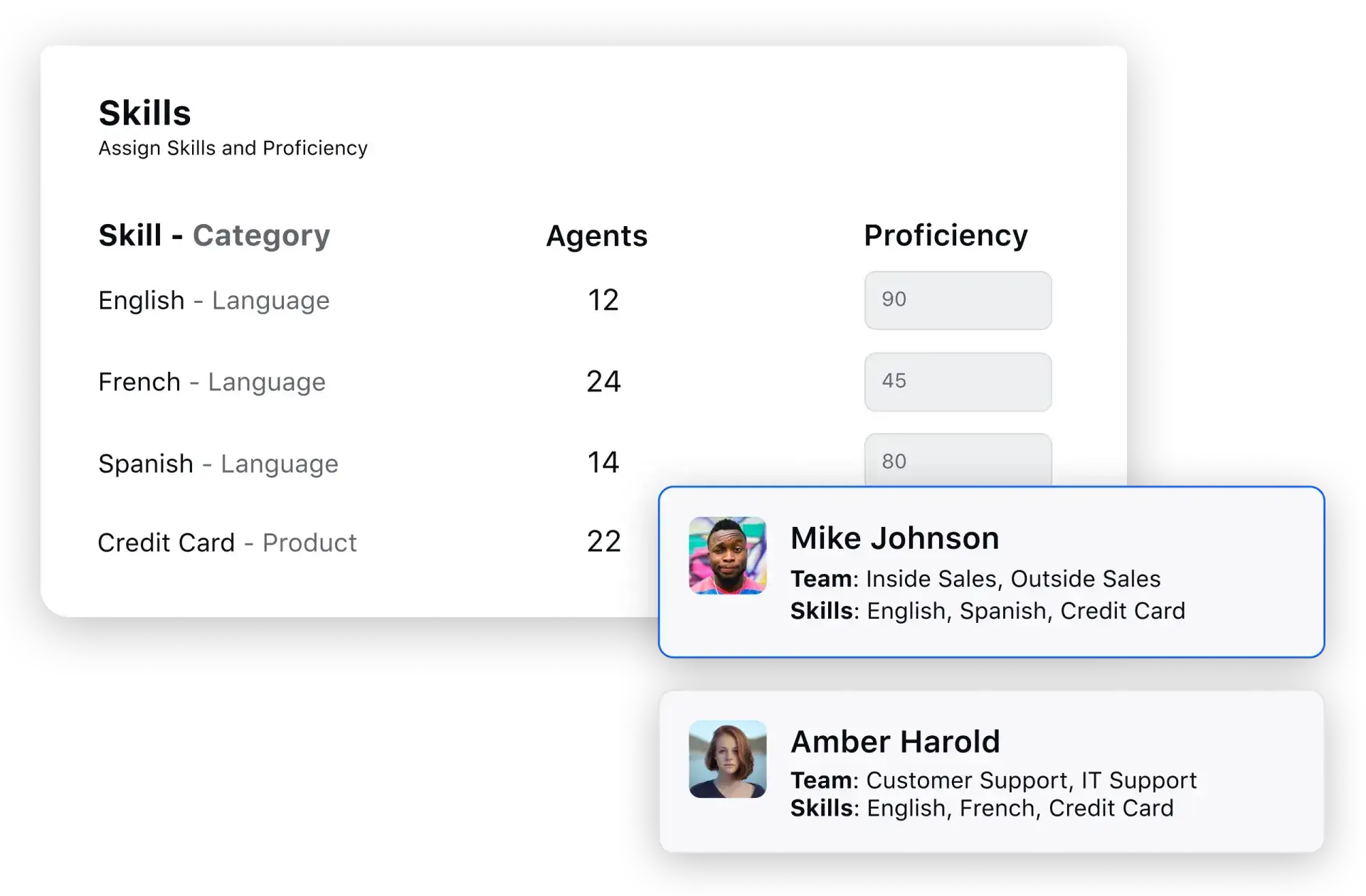
It derives customer satisfaction scores and quality scores of individual agents, broken down by skills. Once out, this information is leveraged to identify which skills are associated with higher levels of customer satisfaction and quality and which skills may need improvement.
5. Self-service
Contact center software’s self-service is a suite of support tools and systems designed to help customers resolve issues and access information independently. The information/queries could be related to a business's services, products or policies. The primary goal is to empower customers to perform routine tasks, such as troubleshooting, without the need for direct support from an agent.
It is a must-have requirement in contact center software as it improves operational efficiency and controls costs by reducing the volume of incoming inquiries, allowing agents to focus on more complex issues that require human intervention.
The cost case for self-service is narrower than it was. Gartner predicts that GenAI cost per resolution for customer service will exceed offshore human agent costs by 2030, which means self-service now earns its place through resolution quality rather than per-interaction arbitrage. The requirement to specify is therefore not deflection volume but whether a contained session stays contained, measured by repeat contact within seven days. The self-serve suite consists of tools like interactive voice response (IVR), chatbots, knowledge base, virtual agents, FAQs and Tutorials
6. Compliance and security
One of the major challenges customer service teams face is maintaining customers' trust and adhering to compliance standards. While businesses want to scale their operations, they need to adhere to increasing regulations and stay in sync with the latest compliance regulations.
Maintaining contact center compliance and security is mandatory by law, especially in verticals like finance and government. It maintains security and privacy from data thefts, privacy breaches and other security compromises. It also creates a culture of due diligence, taking care of sensitive information involving your company and its customers.
Four things belong in the specification.
- Ask for the certification list with audit dates rather than logos, since a lapsed SOC 2 and a current one look identical on a slide.
- Specify where data is stored and processed, and extend that question to AI inference, which frequently runs in a different region from the data at rest.
- Specify retention periods and redaction controls for recordings and transcripts, particularly where payment or health data appears.
- Finally, specify the regulatory regimes that apply to your operation and ask the vendor to name the controls that satisfy each rather than confirming coverage in general terms.
7. AI and automation
AI is the most heavily weighted category in a current requirements document, and the one where feature grids are least informative, because every vendor now answers yes to every line on them. Five questions separate the answers.
Native or integrated: Ask whether the AI is built into the core platform or supplied by a third party sitting alongside it, because that determines how much conversation history and account context the AI can reach, and who is accountable when it gets something wrong.
Scope of autonomous resolution: Ask which intents the AI resolves end to end today in production, not which it can be configured to attempt. Ask for the resolution rate on those intents and how the vendor measures it.
Escalation design: A platform built purely for deflection is the wrong purchase under current regulatory pressure. Regulatory changes related to AI are expected to increase assisted service volume by 30% by 2028, as rules mandating access to a human lead customers to request one by default. Specify that escalation carries out the full conversation and account context, and that the customer is not returned to the start of a queue.
Audit trail and governance: Ask to see the decision log for a single resolved case, showing what the AI did, which systems it touched and on what basis. Specify who can change AI behaviour, whether changes are versioned and whether your data is used for model training.
Commercial definition: If any part of the pricing is outcome-based, specify in the contract what counts as a resolution, because the vendor’s definition and yours are rarely the same one.
Sprinklr’s AI Agent Platform handles autonomous resolution across voice and digital channels, and Sprinklr Copilot supports human agents inside the same console, so AI and agent activity resolve against one record rather than two.
8. Reporting and analytics
Speech analytics and unified reporting are crucial components of contact center software as they are leveraged to understand customer interactions in detail and extract valuable insights.
Speech analytics provides a nuanced understanding of customer interactions as it transcribes and analyzes spoken words during real-time and recorded customer-agent conversations, extracting valuable insights such as customer sentiments, recurring issues and opportunities for improvement.
Learn more: Comprehensive guide on customer interaction analytics
Unified reporting consolidates data from various customer service channels and touchpoints into a centralized platform. It integrates data from diverse channels, such as voice calls, emails, chats and social media interactions, presenting a cohesive narrative of the customer journey.
With a plethora of users like agents, supervisors and quality managers, reporting and analytics need to be dynamic to cater to the diverse needs of users. The user interface should adapt dynamically based on roles, ensuring a personalized experience for agents, supervisors, quality assurance teams and decision-makers.
One requirement is easy to miss and hard to retrofit: AI-handled volume and agent-handled volume have to appear in the same report. Where they sit in separate systems, nobody can see the full picture of what the operation resolved, and the AI investment case becomes impossible to audit.
By tailoring the interface to each persona, the system optimizes usability, providing relevant data for informed decision-making and enhancing the overall efficiency of the contact center operations. Read more: Understand the A to Z of contact center analytics
9. Flexibility and scalability
Find a Contact center as a service (CCaaS) platform to leverage cloud deployment, as it is a must-have for unparalleled flexibility. By migrating operations to the cloud, organizations gain the agility to adapt swiftly to changing business needs. This flexibility is particularly crucial in handling fluctuating call volumes, seasonal demands, or unforeseen events.
API integration is integral to building a flexible and scalable contact center ecosystem. APIs (Application Programming Interfaces) allow seamless communication between different software applications, enhancing the overall functionality of the contact center.
10. Cost management
Predictive cost analytics leverages historical data, real-time insights and forecasting models to enable accurate predictions of future expenses, helping organizations make informed decisions. This approach allows for better resource allocation, optimized staffing levels and cost-effectiveness without compromising service quality.
User licensing is a key component of cost management that provides organizations with flexibility and control over their expenditures. By implementing user licensing models, contact centers can tailor their software usage to specific needs, aligning costs with actual usage patterns. This not only ensures that organizations pay for what they use but also allows for scalability and adaptability in response to changing operational requirements.
License cost is one line of several, and comparing vendors on it alone reliably picks the wrong one. A usable model covers implementation and professional services, integration build, usage-based charges for voice and messaging, the cost of AI processing, and the internal administration effort the platform demands after go-live. Build it over three years, since implementation cost front-loads year one and usage charges compound after it.
Technical and system requirements
Software capability is one half of the requirements list. The other half is what your system environment needs for the platform to run properly, and this is where it shows up late in a procurement when it should have been settled at the start.
1. Network and bandwidth
Voice quality depends on sustained bandwidth per concurrent agent rather than aggregate office throughput, and on latency and jitter staying inside the vendor’s stated tolerance. Specify concurrent agent count per site, then ask the vendor for the per-agent figure and the point at which call quality degrades.
2. Endpoints and browsers
Cloud platforms run in the browser, so specify the browser and operating system versions your estate supports and confirm the vendor supports the same set. Flag any locked-down or virtual desktop environments early, since these frequently break browser-based voice.
3. Identity and access
Specify your identity provider, whether single sign-on is mandatory, and whether role-based access has to map onto existing directory groups. Confirm support for automated user provisioning if you need joiners and leavers handled without manual work.
4. Telephony
If you are keeping existing numbers, specify porting scope and timeline. If you are keeping your carrier, confirm the platform supports bringing your own trunk rather than requiring you to move voice to the vendor.
5. Integration prerequisites
Specify which systems have to be connected on day one, then ask about API rate limits, whether a sandbox is available for build and testing, and whether each integration is prebuilt or a professional services engagement.
Infrastructure and equipment requirements
Cloud deployment removes most of the on-premises footprint but not all of it, and the residual list is worth writing down rather than assuming.
Agents need a workstation capable of running the platform alongside whatever else stays open during a call, a headset specified for contact center use rather than general office calls, and a connection that holds up whether they work from a site or from home. Dual monitors are not universal, but they matter wherever agents work across a separate CRM or order management system.
Hybrid setups keeping some voice infrastructure on-premise carry a longer list, covering session border controllers, network equipment sized to concurrent call volume and power redundancy at each site. On-premise vs. cloud contact center: which one is better? sets out the trade-off in full.
For remote and distributed agents, specify a minimum home connection standard and decide whether you issue equipment or publish a specification and reimburse. That is a policy decision more than a technical one, but it carries cost and belongs in the requirements document rather than in the implementation plan.
Team and staffing requirements
Every software requirement assumes a team capable of using the software, and that assumption is better stated during procurement than discovered after go-live.
1. Agent skills
Specify the channels agents will handle and the language standard each one demands. Digital channels require a level of written fluency that voice hiring does not screen for, and blended roles require both at once.
2. Supervisor coverage
Specify the supervisor-to-agent ratio you intend to run, because it determines how much of the monitoring and coaching workload the platform has to carry. A thin supervisory layer raises the requirement on automated quality scoring considerably.
3. Administration
Specify who will configure routing, build reports and maintain the knowledge base once the platform is live, and whether that is an existing role or a new hire. A platform that needs developer involvement for routine configuration carries a standing staffing cost that never appears in the license quote.
4. Training and onboarding
Specify how long you can afford a new agent to take to reach full productivity, then ask the vendor what their customers achieve rather than what the platform allows. The requirement is moving rather than static: in the same research, Gartner found that nearly 80% of organizations plan to shift at least some agents into new roles and 84% plan to add new skills to frontline positions.
How to prioritize contact center software requirements
Requirements are only useful once they are ranked, because no platform scores full marks against all of them. Separate the list into what the operation cannot run without, what would materially improve it, and what is worth having if it arrives included, and anchor that ranking in your current performance data rather than in preference. Set the weighting before you see any vendor material, so the scoring is not quietly reverse-engineered from whichever demo went best. To draft your contact center software requirements, apart from looking into your organization's requirements, you also need to look around and see what the current contact center trends are.
Key factors to choose your contact center software
When choosing contact center software, CX leaders must consider key factors to align with their organization's needs:
- Purpose: Define the objectives and purpose behind the decision, such as sales, warranty claims, or loyalty programs, to determine essential applications and services.
- Types: Consider inbound, outbound or omnichannel contact centers and assess the potential for outsourcing services.
- Architecture: Decide between cloud-based or on-premises solutions based on corporate policies and expansion plans.
- Channels: Evaluate how vendors support interaction channels, including voice, email, SMS, chat and video.
- Agent flexibility: Assess agent workstyles, whether centralized, remote or hybrid and consider future remote work plans.
- Management tools: Determine the need for specialized management and monitoring tools to measure performance, automate processes or provide business metrics.
Once you get clarity on the six factors, compare contact center software options provided to you by different CCaaS vendors based on the requirements and choose the best CCaaS software for your business.
Why Sprinklr Service is your best choice
Customers expect consistent experiences and have higher expectations from businesses. If you want to keep up and score an A in customer service, you need to deploy Sprinklr Service. It is the first purpose-built Contact Center as a Service (CCaaS) scaling customer service across 30+ digital and traditional channels, including voice, self-service systems, AI bots and one unified view of the customer.
Powered by an advanced AI engine on the Unified Customer Experience Management (Unified-CXM) platform, Sprinklr Service analyzes billions of customer interactions in real time across various channels to identify intent and sentiment and efficiently route customers to the right support. Apart from that, you get to:
- Analyze your most frequent customer queries using our advanced AI engine
- Streamline all customer service processes into a single window for maximum visibility to agents and supervisors alike.
- Help agents and support teams across the globe collaborate seamlessly on tickets and move them toward quicker resolutions.
- Ensure maximum security for customer data collected throughout the process
- Identify gaps in agent performance and suggest areas of improvement using detailed reports to increase individual productivity and overall team efficiency.
These software requirements are essential for a modern contact center to deliver effective customer service, optimize operations and adapt to changing business needs. The power to construct a better world for your customers and agents lies within your grasp. But why take our word for it? Experience the magic yourself. Take Sprinklr Service for a test drive with a free demo.
Frequently Asked Questions
A complete checklist covers four layers. Software capability spans routing, customer interaction management, quality management, coaching, self-service, security, AI, reporting, scalability and cost control. System requirements cover bandwidth, browsers, identity and telephony. Infrastructure covers agent equipment and any on-premise voice hardware you are retaining. Staffing covers the skills, supervisory ratio and administrative capacity needed to run the platform once it is live.
Ask whether the AI is built into the core platform or integrated from a third party, since that determines how much context it can reach and who is accountable when it fails. Then ask for the escalation design, the audit trail for one AI-handled case, where AI processing happens geographically, and how the vendor defines a resolution if any part of the pricing is outcome-based. A demo of a scripted flow is evidence of very little.
A requirements list is the internal document setting out what your operation needs and how heavily each item is weighted. An RFP is the external document asking vendors to respond against it. The requirements list comes first, and an RFP written without one produces proposals that cannot be compared against each other.
Sustained bandwidth per concurrent agent rather than aggregate office throughput, network latency and jitter inside the vendor’s stated tolerance, supported browser and operating system versions on every agent endpoint, an identity provider the platform can integrate with, and support for bringing your own carrier if you are porting existing numbers.
Licence fees are one component of several. A realistic model covers implementation and professional services, integration build, usage-based charges for voice and messaging, and the cost of AI processing. Gartner expects more than 50% of customer service organizations to double their technology spend by 2028 without an equivalent reduction in talent, so a three-year total cost model is a more reliable basis for comparison than an annual licence quote
Aksheeta Tyagi is an experienced content marketer specializing in customer service, customer experience, contact center technology and AI-powered customer support. She writes in-depth guides on customer feedback management, conversational AI, agentic AI and enterprise service transformation to help businesses deliver better customer experiences at scale.